VSAN In 3 Minutes Series

These are so cool I had to recognize them. If you are like me and would rather see things in action than read about them in a manual, then the VSAN In 3 Minutes Series is for you.

VSAN in 3 Minutes Series

Check the videos out. A big shout out to my colleague Greg Mulholland who does a great job putting these together.

VMware Virtual SAN at Storage Field Day 9 (SFD9) – Making Storage Great Again!

On Friday, March 18 I took the opportunity to watch the live Webcast of Storage Field Day 9. If you can carve our some time, I highly recommend this.

Tech Field Day‎@TechFieldDay
VMware Storage Presents at Storage Field Day 9

The panel of industry experts ask all the tough questions and the great VMware Storage team answers them all.

Storage Industry Experts VMware Virtual SAN Experts
  • Alex Galbraith @AlexGalbraith
  • Chris M Evans @ChrisMEvans
  • Dave Henry @DaveMHenry
  • Enrico Signoretti @ESignoretti
  • Howard Marks @DeepStorageNet
  • Justin Warren @JPWarren
  • Mark May @CincyStorage
  • Matthew Leib @MBLeib
  • Richard Arnold @3ParDude
  • Scott D. Lowe @OtherScottLowe
  • Vipin V.K. @VipinVK111
  • W. Curtis Preston @WCPreston
  • Yanbing Le @ybhighheels
  • Christos Karamanolis @XtosK
  • Rawlinson Rivera @PunchingClouds
  • Vahid Fereydouny @vahidfk
  • Gaetan Castelein @gcastelein1
  • Anita Kibunguchy @kibuanita


The ~2 hour presentation was broken up into easily consumable chunks. Here’s a breakdown or the recoded session:

VMware Virtual SAN Overview

In this Introduction, Yanbing Le, Senior Vice President and General Manager, Storage and Availability, discusses VMware’s company success, the state of the storage market, and the success of HCI market leading Virtual SAN in over 3000 customers.

What Is VMware Virtual SAN?

Christos Karamanolis, CTO, Storage and Availability BU, jumps into how Virtual SAN works, answers questions on the use of high endurance and commodity SSD, and how Virtual SAN service levels can be managed through VMware’s common control plane – Storage Policy Based Management.

VMware Virtual SAN 6.2 Features and Enhancements

Christos continues the discussion around VSAN features as they’ve progressed from the 1st generation Virtual SAN released in March 12, 2014 to the 2nd, 3rd, and now 4th generation Virtual SAN that was just released March 16, 2016. The discussion in this section focuses a lot on data protection features like stretched clustering and vSphere Replication. They dove deep into how vSphere Replication can deliver application consistent protection as well as a true 5 minute RPO based on the built in intelligent scheduler sending the data deltas within the 5 minute window, monitoring the SLAs, and alerting if they cannot be met due to network issues.

VMware Virtual SAN Space Efficiency

Deduplication, Compression, Distributed RAID 5 & 6 Erasure Coding are all now available to all flash Virtual SAN configurations. Christos provides the skinny on all these data reduction space efficiency features and how enabling these add very little overhead on the vSphere hosts. Rawlinson chimes on the automated way Virtual SAN can build the cluster of disks and disk groups that deliver the capacity for the shared VSAN datastore. These can certainly be built manually but VMware’s design goal is to make the storage system as automated as possible. The conversation moves to checksum and how Virtual SAN is protecting the integrity of data on disks.

VMware Virtual SAN Performance

OK, this part was incredible! Christos laid down the gauntlet, so to speak. He presented the data behind the testing that shows minimal impact on the hosts when enabling the space efficiency features. Also, he presents performance data for OLTP workloads, VDI, Oracle RACK, etc. All cards on the table here. I can’t begin to summarize, you’ll just need to watch.

VMware Virtual SAN Operational Model

Rawlinson Rivera takes over and does what he does best, throwing all caution to the wind and delivering live demonstrations. He showed the Virtual SAN Health Check and the new Virtual SAN Performance Monitoring and Capacity Management views built into the vSphere Web Client. Towards the end, Howard Marks asked about supporting future Intel NVMe capabilities and Christos’s response was that it’s safe to say VMware is working closely with Intel on ensuring the VMware storage stack can utilize the next generation devices. Virtual SAN already supports the Intel P3700 and P3600 NVMe devices.

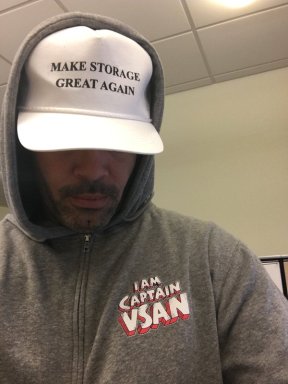
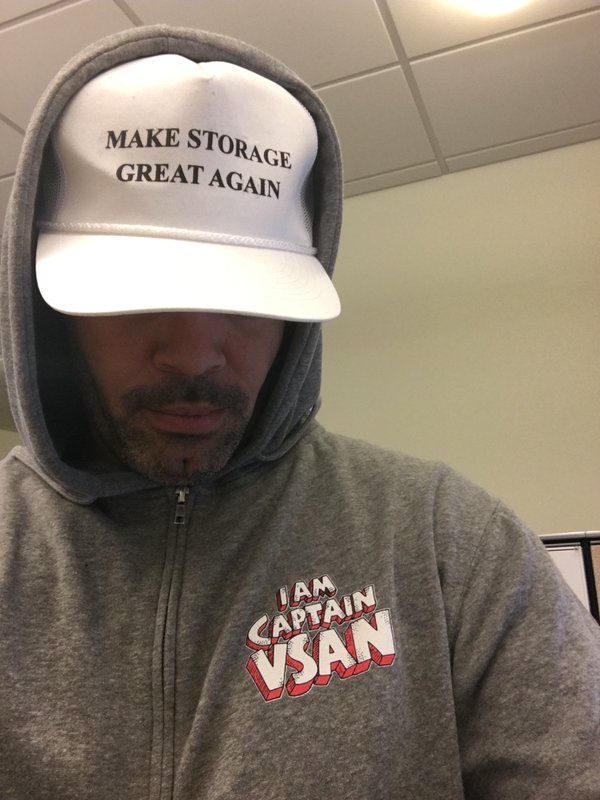
This was such a great session I thought I’d promote it and make it easy to check it out. By the way, here’s Rawlinson wearing a special hat!

Make Storage Great Again


How To Configure the Cisco 12G SAS Modular Raid Controller for Pass-Through Mode

Yesterday I was at the New England VTUG event which is always a great event to meet up with familiar faces and be introduced to some new ones. I met up with a relatively new VMware Virtual SAN customer and we discussed lots of fun things about VSAN and their implementation experience. One frustrating thing they mentioned is that they couldn’t find anywhere that documented how to put the Cisco 12G SAS Modular Raid Controller in Pass-Through mode. They explained that after lots of searching on VMware and Cisco’s site, they contacted Cisco and were provided the information. They were kind enough to capture a screenshot of the setting and provide it to me.

The procedure is:

  • Log into the Cisco UCS Manager
  • Open a console to the host
  • Reboot the host
  • On boot up hit Ctrl+R to enter the Cisco 12G SAS Modular Raid Controller BIOS Configuration Utility
  • Hit Ctrl-N until the “Ctrl Mgmt” page is selected
  • In the bottom right hand corner, make sure the “Enable JBOD” field shows an X per the screen shot below.
  • Hit Ctrl-S to save Reboot

Cisco 12G SAS Enable JBOD

That’s it. Easy.

If this is a brand new, unconfigured host, the unclaimed disks in the host will now get passed to ESXi and VSAN can use them for the VSAN datastore.

However, if this host IO Controller had previously been configured with RAID, you should check out: How to delete the RAID configuration from drives managed by the Cisco 12G SAS Modular Raid Controller

I hope that helps others save some time in getting VSAN up and running.

Special thanks to Stephanie Forde and Matthew Gabrick from the Boston Water and Sewer Commission for pointing this out and providing the screenshot.

Queue Depth and the FBWC Controller Cache module on the Cisco 12G SAS Modular Raid Controller for Virtual SAN

If you scan the bill of materials for the various Cisco UCS VSAN ReadyNodes you’ll see a line item for:

Controller Cache: Cisco 12Gbps SAS 1GB FBWC Cache module (Raid 0/1/5/6)

If you’ve followed Virtual SAN for awhile you might wonder, why would the ReadyNodes include controller cache when VMware recommends disabling controller cache when implementing Virtual SAN. Well, it turns out that the presence of the FBWC Cache module allows the queue depth of the Cisco 12G SAS Modular Raid Controller to go from the low 200’s to the advertised 895. The minimum queue depth requirement for Virtual SAN is 256 so including the FBWC Cache module allows the queue depth to increase above that minimum requirement and improve Virtual SAN performance.

Steps to Implement the Correct I/O Controller Driver for the Cisco 12G SAS Modular Raid Controller for Virtual SAN

This is my third post this week, possibly a record for me. All three are centered around ensuring the correct firmware and drivers are installed and running. The content of this post was created by my colleague, David Boone, who works with VMware customers to ensure successful Virtual SAN deployments. When it comes to VSAN, its important to use qualified hardware but equally important to make sure the correct firmware and drivers are installed.

Download the Correct I/O Controller Driver

Navigate to the VMware Compatibility Guide for Virtual SAN, scroll down and select “Build Your Own based on Certified Components”, then find the controller in the database. Here’s the link for the Cisco 12G SAS Modular Raid Controller and the link to download the correct driver for it (as of Nov. 20, 2015): https://my.vmware.com/web/vmware/details?downloadGroup=DT-ESX55-LSI-SCSI-MEGARAID-SAS-660606001VMW&productId=353

Install the Correct Driver

Use your favorite way to install the driver. This might include creating a custom vSphere install image to deploy on multiple hosts, rolling out via vSphere Update Manager (VUM), or manually installing on each host.

Continue reading “Steps to Implement the Correct I/O Controller Driver for the Cisco 12G SAS Modular Raid Controller for Virtual SAN”

What Makes EVO:RAIL Different

EVO:RAIL is the only Hyper-Converged solution that ships Pre-Built with VMware software and is ready to deploy VM’s when it arrives. There, that’s it.

OK, maybe you want more detail than that.

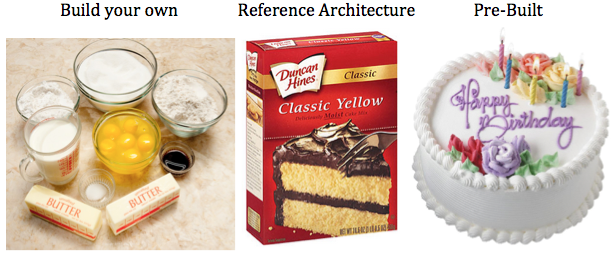
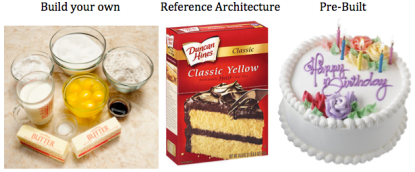
This analogy has been used before but it’s worth repeating for those who haven’t heard it before. This comes from my days as a vSpecialist at EMC. If you want a cake, you have 3 primary options.
cake

The first way to get a cake is you Build your own. You purchase the ingredients (flour, eggs, milk, etc.), you measure the quantities you think you need, mix them together, and make a cake. The second time you make one it might be a bit better based on some lessons learned. Eventually, if you do it enough, you’ll probably get pretty good at it.

The second way to get a cake is to buy a Reference Architecture. This is a specific set of pre-measured ingredients that you buy, but you still have to make it. You open the box, add eggs and water to the mix and the end result is a cake. If you make another, it’ll probably be pretty similar to the last one.

The third option is you go to a bakery and buy a cake. It’s professionally made and ready to eat. And if you want another one just like it, your favorite bakery can reproduce it and get it to you pretty quickly.

Lets now shift this analogy to data center infrastructure. The first way to get data center infrastructure is to build your own (i.e. bake a cake). Purchase your favorite servers, network switches, and storage system, connect them together, configure them, install VMware software, and eventually you’ll have a place to provision virtual machines. The next time you need to build out infrastructure you’ll likely be able to do it a bit faster, with less configuration errors, and have it run more optimally based on some lessons learned. Eventually, if you do it enough you’ll get pretty good at it.

The second way to get data center infrastructure is to purchase a prepackaged reference architecture solution, but you still have to make it (i.e. cake mix). You get the hardware, connect it to the network, install VMware software, and you have infrastructure. The performance is fairly predictable since the hardware was chosen to meet a certain workload profile.

The third option to get data center infrastructure is to purchase a pre-built solution (i.e. bakery). And this is where EVO:RAIL is different. There are only 3 ways I know of to purchase infrastructure pre-built with VMware software that is ready to provision VM’s when they arrive. The first way that emerged several years ago is VCE Vblock or VxBlock. The second way now available is the Hyper-converged EVO:RAIL from an Qualified EVO:RAIL Partner (Dell, EMC, Fujitsu, HP, Hitachi, inspur, NetApp, netone, and SuperMicro). Receive the system, power it on, and start provisioning VM’s since its already running the VMware software you need to do so. The third way is EVO:RACK which is currently available as a tech-preview from a few Qualified EVO:RACK Partners. More information is available here: EVO: RACK Tech Preview at VMworld 2014

That’s it, no one else, without a specific agreement to do so, can ship hardware pre-built with VMware software, just VCE and Qualified EVO:RAIL and EVO:RACK Partners. All other “converged infrastructure” solutions, require you to obtain the hardware (either by picking and choosing components yourself, or by going with a reference architecture). None of them are able to arrive with VMware software already installed. Once the hardware arrives the VMware software must be installed first. And in the case of all other “converged” infrastructure solutions other than VMware Virtual SAN, you must install the storage software on top of vSphere. VI wrote about this here: What Makes VSAN Different?

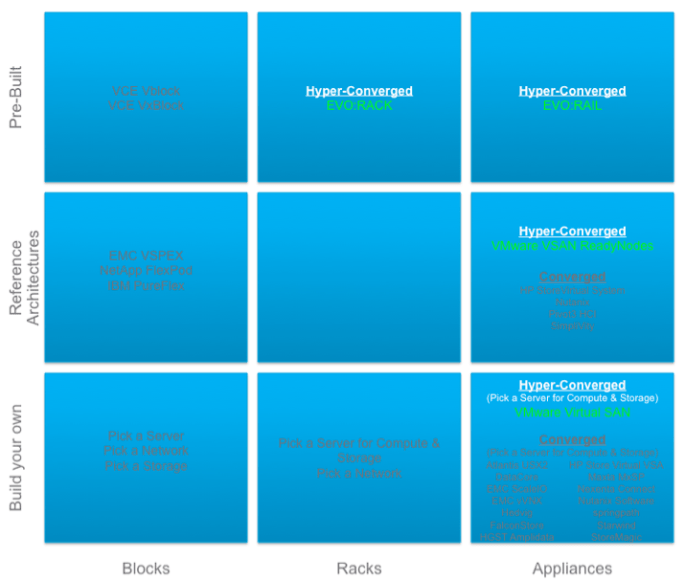
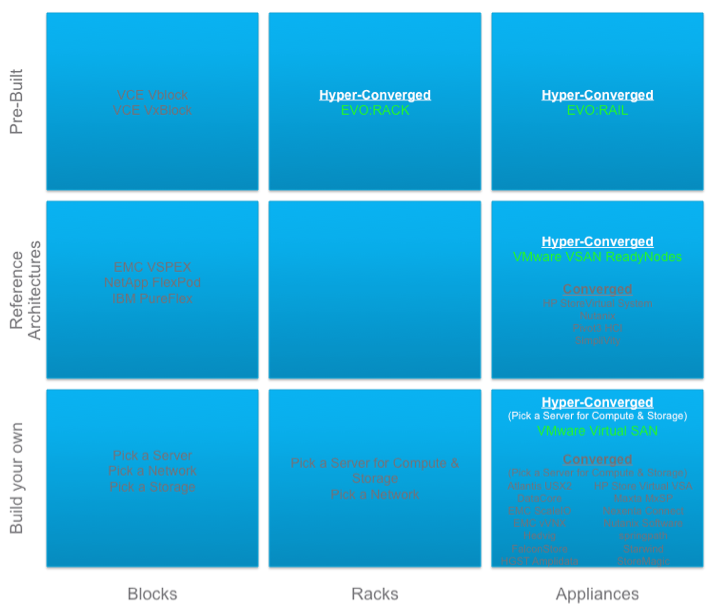
OK, lets review with a diagram I put together based on EMC’s recent definition of Blocks, Racks, and Appliances. See the Virtual Geek blog here for more info: EMC World Day 1: BLOCKS, RACKS, APPLIANCES.

Block, Rack, Appliance

Notice that the concept of Build your own converged infrastructure combining compute and storage on the same host is not unique. There are approximately 15 companies with this solution including VMware. It’s a crowded space. VMware Virtual SAN is unique here in that it’s the only one that is built into the hypervisor.

Next notice that the concept of Reference Architecture converged infrastructure is not unique. There are approximately 5 companies with this solution including VMware. VMware Virtual SAN is unique here in that it’s the only one that is built into the hypervisor.

Finally, notice that there is only 1 way to obtain Pre-Built converged infrastructure and that’s EVO:RAIL which uses the VMware Virtual SAN storage that is built into the hypervisor. All you need to do is rack it, cable it, power it on, and start consuming VM’s. Kind of like buying a cake from the bakery, getting a fork, and start eating it.

OK, one last analogy… today, if you need a Virtual Machine and even EVO:RAIL isn’t a quick enough way to get it, it’s possible to simply provision one on demand from a service provider like vCloud Air. Now, wouldn’t it be great if you could get a piece of cake on demand? How long until this becomes a reality?
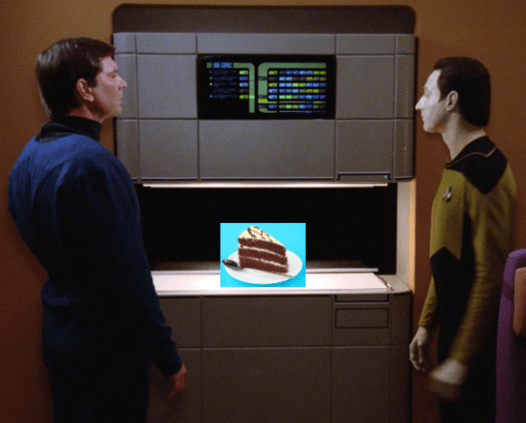
Data cake

What Makes VSAN Different?

I had a question today asking how VMware Virtual SAN (VSAN) compares to XYZ company. There are over a dozen virtual machine software based solutions that leverage the local disks in ESXi hosts to present storage back to the hosts in the vSphere cluster. Those solutions require a vSphere cluster to be created then their virtual machine must be installed on every host to handle the storage services. Some are more efficient at this than others but there is always level of effort to “build-your-own” storage on top of the vSphere cluster and those virtual machines can take up significant host resources to deliver on the storage services they offer. So converged infrastructure itself is nothing new or unique. Its how it’s done that is important.

Here’s what makes VMware Virtual SAN (VSAN) different:

  • VSAN is the ONLY software defined storage solution that is embedded into the ESXi hypervisor making it the most efficient data path for performance.  VM’s send their data through the hypervisor right to disk, there’s no middle man.  In addition, VSAN is the most efficient in its use of the host resources to deliver on the storage service. VSAN is designed to take up no more than 10% of the host CPU and memory resources and testing with vSphere 6 show significantly less impact than that. Since VSAN is not a VM on top of the hypervisor, it has this distinct advantage. This was a positive tradeoff for the fact that VSAN is a VMware vSphere only solution.
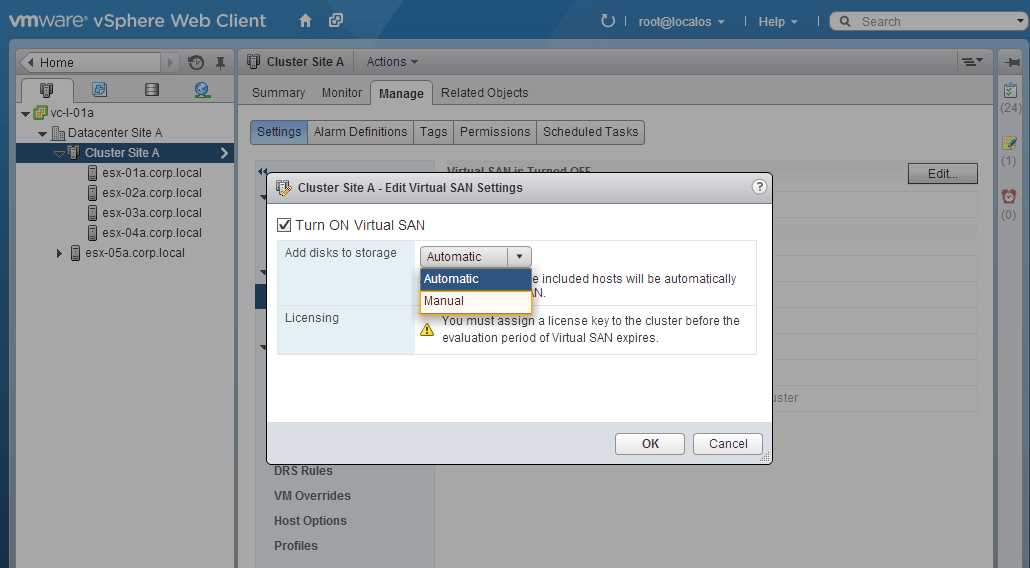
  • Being built in also makes it simple and easy to manage. There is no VSAN install, it is simply enabled as a feature of the hypervisor by clicking a check box. When enabled, VSAN will collect all the local disks on all the hosts and create the VSAN Datastore. Bear in mind, the server IO controller and disks must be in place and networking configurations must be completed to make sure VSAN will work when you click that check box.

VSAN Checkbox

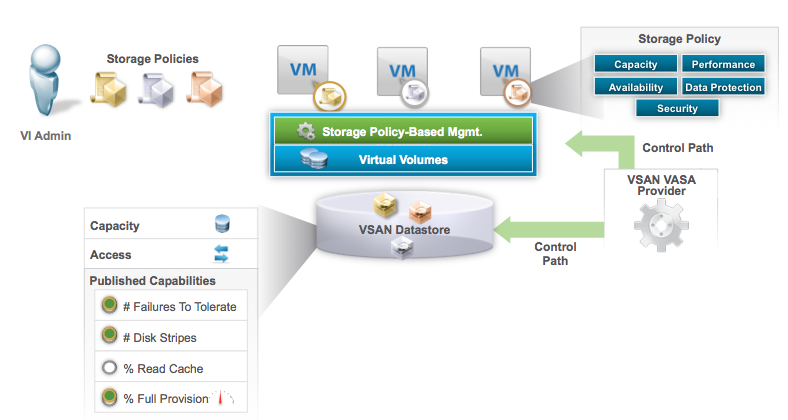
  • VSAN is fully integrated into VMware Storage Policy Based Management (SPBM), VASA, and VVOLs. When that check box is clicked, the VSAN datastore is created and it’s VASA provider is registered with vCenter to expose it’s capabilities to SPBM. This allows different policy to be created so the same pool of capacity can deliver different service levels to different VM’s based on performance, availability, and protection. When VM’s are attached to a policy service level, their VM objects get created on the VSAN datastore in the form of Virtual Volume (VVOL) objects. VSAN further breaks these VVOL objects up into components to deliver on the defined protection and performance service levels.

VSAN and SPBM

  • VSAN deals with data protection at the software layer so it doesn’t suffer the performance and capacity penalty of hardware RAID. Different “tiers” of protection can be defined by policy and set for different VM’s using the same pool of disks in the VSAN datastore.  Numbers of Failures to Tolerate settings determine how many data replicas are written to different hosts to deliver the desired protection level for VM’s.
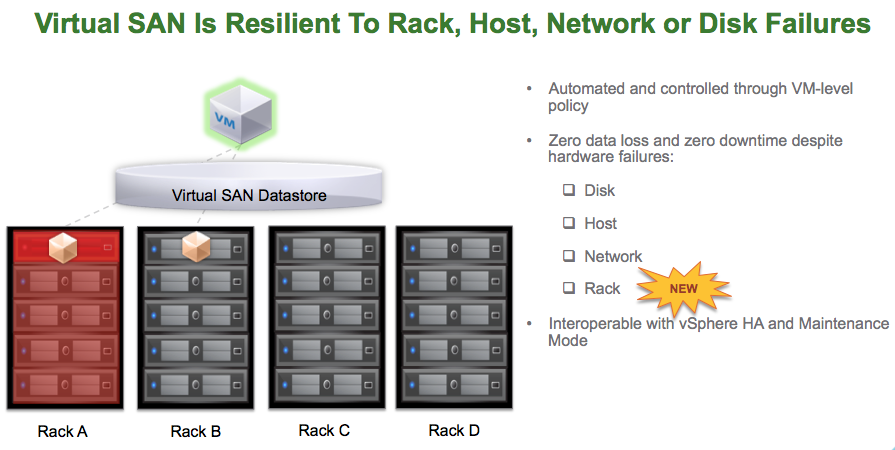
  • VSAN now supports a feature called “Rack Diversity”.  I wrote about the benefits here.  This brings Software Defined Self Healing with Failure Domains.  Hosts in the same rack can be placed into the same fault domain so that if an entire rack is lost then data remains available since another replica copy of the data resides on another host in another rack.

VSAN Rack Diversity

  • VSAN is a hybrid storage solution leveraging SSD as cache to accelerate both reads and writes and low cost high capacity hard disks to persist the data. This results in near All-Flash array performance at a fraction of the cost. With vSphere 6 along with Virtual SAN 6, an All-Flash VSAN is supported delivering extreme performance.

VMware Virtual SAN™ 6.0 Performance

  • VSAN is one of the few software based storage solutions that can leverage the in host SSD/Flash for Read AND Write caching. There are many solutions that can leverage in host SSD/Flash for read caching. Write back caching is more difficult to implement but VSAN does it while maintaining high availability of those writes across the cluster.

All other converged software based storage solutions require running a Virtual Machine on top of ESXi. So all VM’s have to go through their own IO path, through the hypervisor, then through that single VM IO path, then back through the hypervisor, then to the disks. In some cases, the disks themselves need to be setup with a hardware RAID configuration then their VM solution implements software RAID in addition to the underlying hardware RAID paying a double performance and capacity penalty. Each of these VM’s take on additional host CPU and Memory. Some require 2-4 vCPU’s and 16GB or more of RAM. And some are limited to the number of nodes they can scale to and how much total capacity can be supported. Again, some solutions are more efficient and scalable than others so do the homework and ask the right questions when comparing. Finally, most don’t support VMware’s Storage Policy Based Management which is the VMware framework for managing all vSphere storage going forward.

VMware’s vision for Virtual SAN is that it be the best storage solution for Virtual Machines. With the release of vSphere 6 and Virtual SAN 6, VMware is closer to that vision. There are many software defined storage choices out there.  Hopefully this helps in that decision making process.

VMware Jobs!!! – Software Defined Storage (Virtual SAN, EVO:RAIL, etc.)

I’ve been at VMware for 1.5 years and have had a blast talking to customers, partners, and VMware employees about all things software defined storage. This primarily involves Virtual SAN & EVO:RAIL which take advantage of VASA, Storage Policy Based Management, and VVOLS. Because we are talking about storage it also includes discussing the benefits of vSphere Replication, Site Recovery Manager, and vSphere Data Protection. Basically, anything to do with storing, protecting, and managing Virtual Machine data.  Its exciting to be part of the whole software defined data center strategy.

We are growing our Software Defined Storage team and are looking for qualified rockstars. If you are one, and the topics above are familiar to you, and you are interested in joining the VMware Software Defined Storage Team, then check out the openings below.  Feel free to apply directly or reach out to me with any questions at: pkeilty at vmware dot com

You can find the openings on the VMware Public Job Page: http://vmware.jobs/

Plug in the Requisition Number below to find more details on the openings and full job descriptions:

Systems Engineers

  • Requisition Number 55635BR – Sr. Systems Engineer-Software Defined Storage-East in New York New York United States

We are also looking for SE’s in the Ohio Valley and South East USA. In addition, we are looking for a Technical Field SE in the East. These jobs Requisitions will be posted soon.

Sales

  • Requisition Number 58265BR – Storage Account Executive in Austin Texas United States
  • Requisition Number 58420BR – Storage Account Executive – Federal in Reston Virginia United States
  • Requisition Number 58501BR – Sales Leader, Software Defined Storage – Palo Alto or Austin in Austin Texas United States
  • Requisition 58504BR – Inside Sales Representative, Software Defined Storage in Austin Texas United States

Good luck!