Queue Depth and the FBWC Controller Cache module on the Cisco 12G SAS Modular Raid Controller for Virtual SAN

If you scan the bill of materials for the various Cisco UCS VSAN ReadyNodes you’ll see a line item for:

Controller Cache: Cisco 12Gbps SAS 1GB FBWC Cache module (Raid 0/1/5/6)

If you’ve followed Virtual SAN for awhile you might wonder, why would the ReadyNodes include controller cache when VMware recommends disabling controller cache when implementing Virtual SAN. Well, it turns out that the presence of the FBWC Cache module allows the queue depth of the Cisco 12G SAS Modular Raid Controller to go from the low 200’s to the advertised 895. The minimum queue depth requirement for Virtual SAN is 256 so including the FBWC Cache module allows the queue depth to increase above that minimum requirement and improve Virtual SAN performance.

Steps to Implement the Correct I/O Controller Driver for the Cisco 12G SAS Modular Raid Controller for Virtual SAN

This is my third post this week, possibly a record for me. All three are centered around ensuring the correct firmware and drivers are installed and running. The content of this post was created by my colleague, David Boone, who works with VMware customers to ensure successful Virtual SAN deployments. When it comes to VSAN, its important to use qualified hardware but equally important to make sure the correct firmware and drivers are installed.

Download the Correct I/O Controller Driver

Navigate to the VMware Compatibility Guide for Virtual SAN, scroll down and select “Build Your Own based on Certified Components”, then find the controller in the database. Here’s the link for the Cisco 12G SAS Modular Raid Controller and the link to download the correct driver for it (as of Nov. 20, 2015): https://my.vmware.com/web/vmware/details?downloadGroup=DT-ESX55-LSI-SCSI-MEGARAID-SAS-660606001VMW&productId=353

Install the Correct Driver

Use your favorite way to install the driver. This might include creating a custom vSphere install image to deploy on multiple hosts, rolling out via vSphere Update Manager (VUM), or manually installing on each host.

Continue reading “Steps to Implement the Correct I/O Controller Driver for the Cisco 12G SAS Modular Raid Controller for Virtual SAN”

Verifying the Correct Version of the Cisco UCS C240 Server I/O Controller Firmware – Cisco 12G SAS Modular Raid Controller

Today I was working with Cisco to setup UCS C240 servers for Virtual SAN. As part of the process we needed to verify the Cisco 12G SAS Modular Raid Controller had the correct Firmware Version.

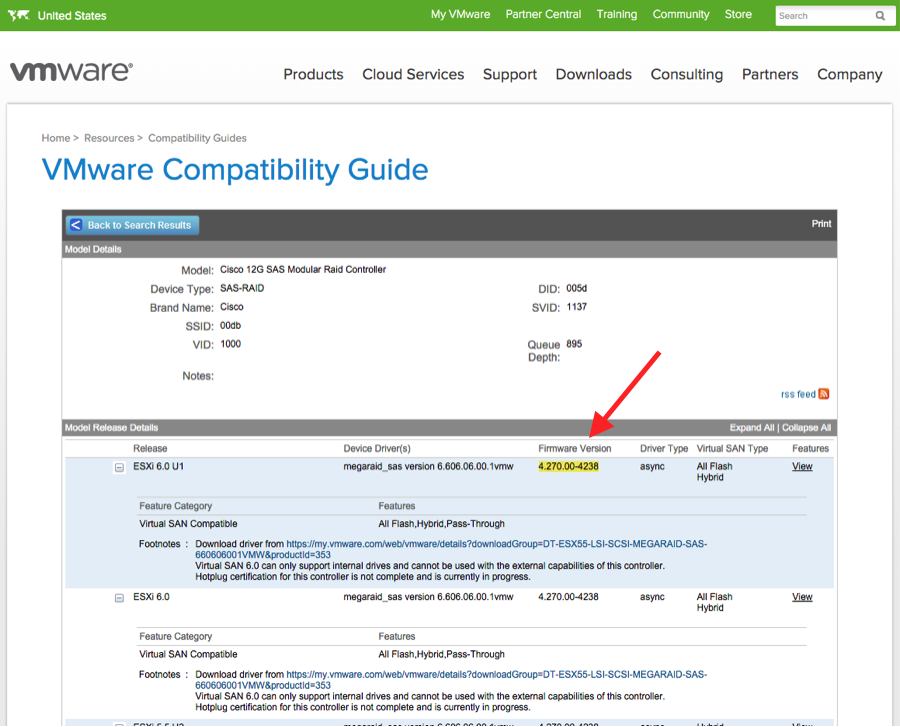
First we went to the VMware Compatibility Guide for Virtual SAN, navigated to the bottom of the page to the link for Build Your Own based on Certified Components. Under “Search For:” we selected “I/O Controller” and under “Brand Name:” we selected “Cisco” and found the listing for the Cisco 12G SAS Modular Raid Controller. It requires Firmware Version 4.270.00-4238.

vcg-Cisco 12G

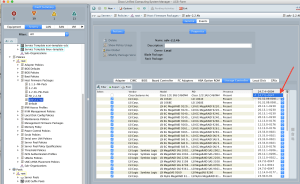
Next we went into the Cisco UCS Manager and navigated to the Host Firmware Packages and found that the Storage Controller Firmware Package was 24.7.0-0047.

CiscoUCS1

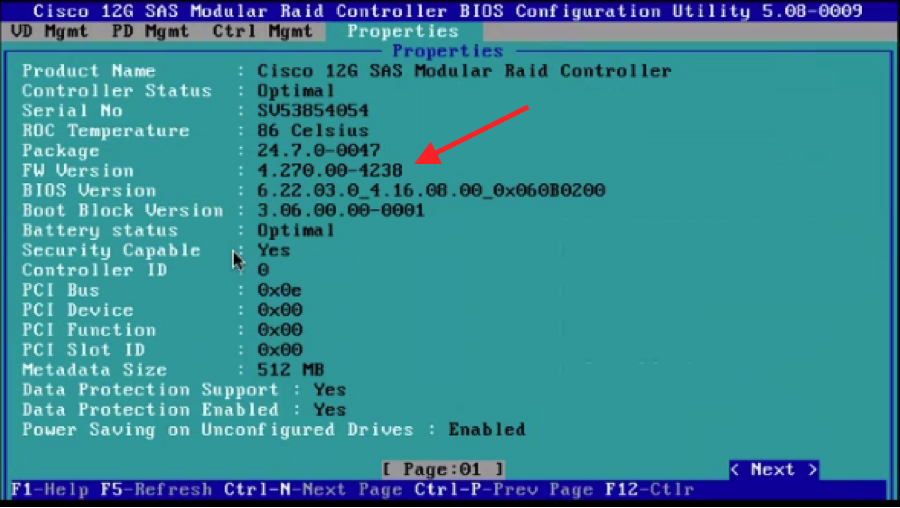
Through UCS Manager there is no way to get the I/O Controller Firmware Version. So, we had to reboot the host and hit “CTRL-R” to get into the Cisco 12G SAS Modular Raid Controller Bios Configuration Utility.

CiscoUCS2

From here we hit CTRL-N to get into Properties.

CiscoUCS3

On this screen you can see:

Package: 24.7.0-0047

FW Version: 4.270.00-4238

Thus, we were able to confirm that we had the correct Firmware on the I/O Controller. If the FW Version was different than what VMware Virtual SAN supports, you would need to download the correct Firmware Package from Cisco and upgrade.

I hope this helps others save time trying to verify Firmware Versions. Thanks to my VMware Virtual SAN colleague, David Boone, who did most of the work that led to this post and our friends at Cisco for being a great partner and helping navigate UCS Manager and grabbing screenshots.

2 Node Virtual SAN (ROBO VSAN) Deployment

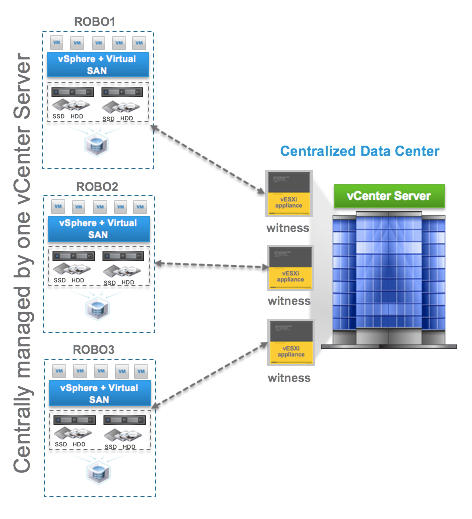
I’ve been asked a few times over the last few weeks for deployment guides or white papers for 2 Node Virtual SAN, typically used to support remote offices (ROBO VSAN). VMware currently doesn’t have specific documentation that I can find but it’s essentially the same process as building a stretched cluster, which is documented in the Administering VMware Virtual SAN guide and the Virtual SAN Stretched Clustering Guide. The difference is that with 2 node VSAN, the two fault domains only have 1 node each and are located in the same site.  We expect the witness VM to be installed on a host back in the primary data center.  The latency of the WAN link back to the primary data center can be up to 500ms and the bandwidth must be a minimum of 1.5Mbps.

In the Administering VMware Virtual SAN guide, we detail how to build a stretched cluster starting on page 51.

http://pubs.vmware.com/vsphere-60/topic/com.vmware.ICbase/PDF/virtual-san-61-administration-guide.pdf

So, basically follow these steps, create two fault domains with 1 host in each and locate them on the same site.  Then deploy the Witness VM back in the production data center. The networking requirements are less complicated since you don’t have to worry about using a Layer 2 stretched or a Layer 3 network between data sites. VSAN supports a Layer 3 network between the ROBO sites and the witness host site.

vsan-robo-wit

Here are a few other helpful blog posts on 2 Node VSAN (ROBO VSAN):

VMware Virtual SAN ROBO Edition

VMware Virtual SAN Cluster ROBO Edition: Configuration Demonstration

2 is the minimum number of hosts for VSAN if you ask me

Virtual SAN Licensing And Packaging For Virtual SAN 6.1

VMworld 2015 Keynote – Storage and Availability

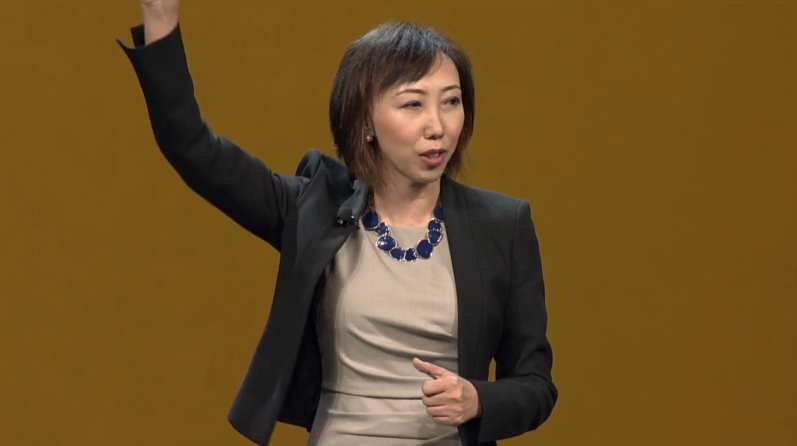
I watched the streaming video of the VMworld 2015 Keynote this morning and there were plenty of highlights. In my mind and many others, Yanbing Li stole the show. Not only did she provide new and impressive announcements, she was funny too. And, she comes from the Storage and Availability Business Unit.

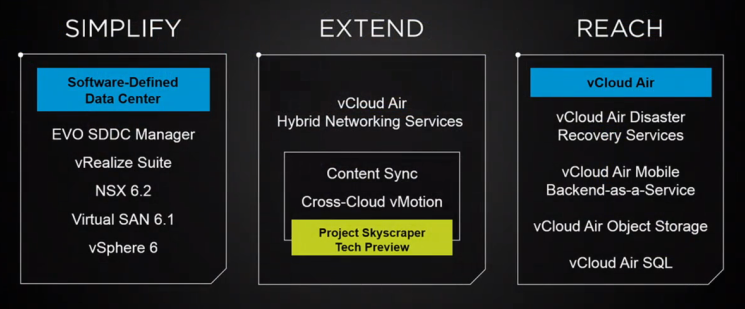
The Keynote began with somewhat cute application mascots escorting Carl Eschenbach on stage. Apps are the important, but, they have to run somewhere,… on infrastructure. Yanbing’s first message was that VMware is constantly working to Simplify infrastructure, which makes sense. Lets make infrastructure as simple as possible so that the focus can be put on the important things, the applications.

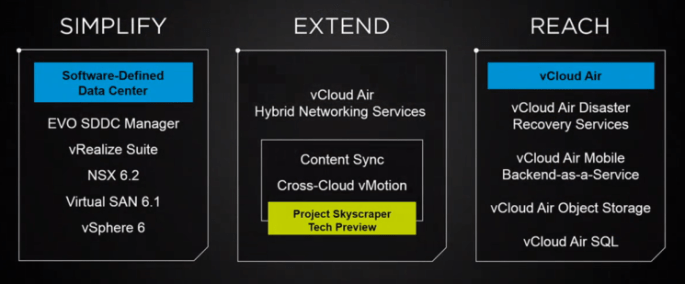
Simplify Extend Reach

Yanbing discussed VMware’s infrastructure foundation being vSphere 6 for compute, NSX 6.2 for network, and for storage she stated “my personal favorite storage platform, Virtual SAN” 6.1. Of course there are lots of other storage choices out there and VASA, VVols, and SPBM aims to simplify the management of those, but if you are looking to build the simplest possibly physical infrastructure then Virtual SAN makes storage a simple extension of the capabilities of the vSphere cluster. Here’s more on “What is new for Virtual SAN 6.1?”.

Once the infrastructure is up and running, vRealize Suite simplifies management of it and the deployment of VM’s. All this infrastructure software has to run on hardware, and that hardware can be a challenge to setup. So, the big announcement is how EVO SDDC Manager will simplify the deployment of physical infrastructure. The same simplification benefits that EVO:RAIL brought will be extended to whole racks of hardware. Each rack will support 1000 VM’s or 2000 VDI’s and provide up to 2M IOPS of storage performance. Using the EVO SDDC Manager, multiple racks can be combined to create a virtual rack that can be divided up into workload domains. These workload domains can be secured with NSX for multi-tenancy protection. In addition, EVO SDDC Manager will provide Non-disruptive LifeCycle Automation to take care of infrastructure and software updates, just like EVO:RAIL does today. Pretty cool. I’m looking forward to seeing this in action.

Next, Yanbing discussed how to Extend your datacenter. Basically, what new things can be done to federate hybrid clouds (between your own datacenters or your datacenter and a public cloud). The first thing discussed was something called Content Library Automatic Synchronization and Yanbing demonstrated syncing VM templates between datacenters or vCloud Air. This is great, but to move live workloads, VMware introduced vCloud Air Hybrid Network Services to enable vMotion between hybrid clouds. Side note, I was part of a project that demonstrated an alpha version of something like this at EMC World a few years back, but, back then we didn’t have NSX. Last year, VMware announced long distance vMotion between customer data centers. But this year, in Yanbing’s words, “we have just witnessed history, cross-cloud vMotion”. Makes you think back to the first time you witnessed the original vMotion.

Finally, Yanbing discussed the benefits of Reach and vCloud Air’s capabilities. Disaster Recovery and Backup Services have been available for awhile to protect critical workloads. But now VMware announces availability of vCloud Air Object Storage as a service which is powered by EMC’s Elastic Cloud Storage.  This is great news for customers as object storage becomes more and more of a requirement and one that can now be satisfied by expanding capabilities of VMware’s Storage and Availability Business Unit and vCloud Air.

There was more to the Keynote presentation but I chose to just focus this post on the Storage and Availability announcements and Yanbing’s presentation. As she walked off stage she yelled “Go VSAN!”… Awesome!

Yanbing Li

Virtual SAN – Disk Hotplug

Yesterday the VMware Compatibility Guide for Virtual SAN was significantly updated to reflect recent certification completed by the team. I should point out that one of the great things about Virtual SAN is that it is a true Software Defined Storage solution in that VMware doesn’t force specific hardware upon customers. This being said, we know customers want and need quality and reliable storage solutions and that there are some low quality components out there that could cause undesirable results with Virtual SAN. For this reason, the team has taken on the daunting task of maintaining a Compatibility Guide for Virtual SAN made up of many hardware vendor IO Controllers, SSD, PCIe, and HDD’s. They do a great job managing the unlimited combinations and handling the requests from the field.

Some of the recent things added that I know many customers have been waiting for are:

Stay tuned for more updates in July.

One thing you might see as you browse various components (IO Controllers, SSD, PCIe, and HDD’s) on the VMware Compatibility Guide for Virtual SAN are:

  • Hot-plug
  • Hot-plug Drive
  • Hot-plug Hard Drive
  • Hotplug certification for this controller is not complete and is currently in progress.
  • Disk hotplug feature is not supported on the driver.
  • The driver does not support SSD hot unplug. Please refer to KB2092959 at http://kb.vmware.com/kb/2092959for more details.

Many customers have asked me what “hotplug” means or misinterpret that drives cannot be replaced without downtime. Here’s how I have responded when asked about this:

The VMware Compatibility Guide (VCG) for Virtual SAN lists the supported components (IO Controllers, SSD, and HDD) for use in Virtual SAN.  In the case of the IO Controllers it is a combination of the controller Firmware and ESXi Device Driver that are qualified for VSAN.  In the case of SSD, PCIe, or HDD’s its the firmware that is qualified.  VMware and our technology partners puts these through rigorous tests to make sure they are enterprise ready.

One of the many tests that are done is “Disk hotplug”.  In this test, VMware starts with a perfectly good vSphere cluster with VSAN enabled and I/O workloads running. Then they walk up to the hardware and yank a HDD or SSD out of one of the hosts.  It should be noted that this scenario would likely never happen on purpose in production.  Its possible to accidentally do it but if following proper maintenance procedures it should never happen. Especially now that vSphere 6.0 / VSAN 6.0 has the ability to blink the LED of a failed disk to properly identify it.  When this “failure” test is executed, some IO Controllers, SSD’s, and HDD’s do not behave properly.  The issue can be due to the firmware/driver combination provided to VMware by the IO Controller manufacturer or could be a problem with the HDD or SSD firmware. The VMware team works with the manufacturers to identify the issues and plan for resolution. Rather than not list the component on Compatibility Guide, VMware chooses to list it but caution against this unlikely event.

By the way, VSAN is smart enough to know the difference between a yanked drive and a drive that is degraded or failed, and triggers different events accordingly.  Since yanking a drive does not actually simulate a failed drive, it’s not really a valid failed drive test. Thus, the hotplug warnings do not apply to a more realistic scenario where a drive fails or has sector errors for instance.  In these scenarios, even the components that fail the hoplug test will behave properly and as expected.  Meaning, once VSAN detects that the disk is bad and marks it as a failed drive, the drives can be evacuated from VSAN using the vSphere Web Client, then technicians are free to remove it from a live system and replace it with a new one. This hardware replacement process can be different for every vendor.

I hope this helps clarify why we list the “hotplug” warnings on various components.

What Makes EVO:RAIL Different

EVO:RAIL is the only Hyper-Converged solution that ships Pre-Built with VMware software and is ready to deploy VM’s when it arrives. There, that’s it.

OK, maybe you want more detail than that.

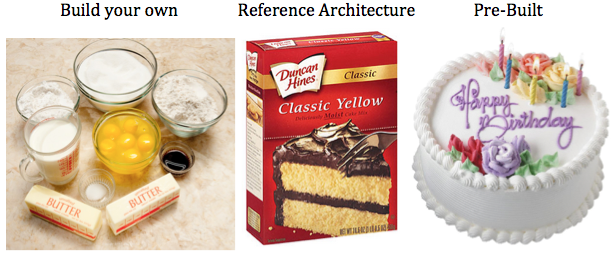
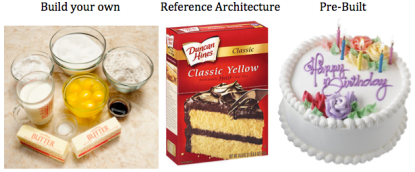
This analogy has been used before but it’s worth repeating for those who haven’t heard it before. This comes from my days as a vSpecialist at EMC. If you want a cake, you have 3 primary options.
cake

The first way to get a cake is you Build your own. You purchase the ingredients (flour, eggs, milk, etc.), you measure the quantities you think you need, mix them together, and make a cake. The second time you make one it might be a bit better based on some lessons learned. Eventually, if you do it enough, you’ll probably get pretty good at it.

The second way to get a cake is to buy a Reference Architecture. This is a specific set of pre-measured ingredients that you buy, but you still have to make it. You open the box, add eggs and water to the mix and the end result is a cake. If you make another, it’ll probably be pretty similar to the last one.

The third option is you go to a bakery and buy a cake. It’s professionally made and ready to eat. And if you want another one just like it, your favorite bakery can reproduce it and get it to you pretty quickly.

Lets now shift this analogy to data center infrastructure. The first way to get data center infrastructure is to build your own (i.e. bake a cake). Purchase your favorite servers, network switches, and storage system, connect them together, configure them, install VMware software, and eventually you’ll have a place to provision virtual machines. The next time you need to build out infrastructure you’ll likely be able to do it a bit faster, with less configuration errors, and have it run more optimally based on some lessons learned. Eventually, if you do it enough you’ll get pretty good at it.

The second way to get data center infrastructure is to purchase a prepackaged reference architecture solution, but you still have to make it (i.e. cake mix). You get the hardware, connect it to the network, install VMware software, and you have infrastructure. The performance is fairly predictable since the hardware was chosen to meet a certain workload profile.

The third option to get data center infrastructure is to purchase a pre-built solution (i.e. bakery). And this is where EVO:RAIL is different. There are only 3 ways I know of to purchase infrastructure pre-built with VMware software that is ready to provision VM’s when they arrive. The first way that emerged several years ago is VCE Vblock or VxBlock. The second way now available is the Hyper-converged EVO:RAIL from an Qualified EVO:RAIL Partner (Dell, EMC, Fujitsu, HP, Hitachi, inspur, NetApp, netone, and SuperMicro). Receive the system, power it on, and start provisioning VM’s since its already running the VMware software you need to do so. The third way is EVO:RACK which is currently available as a tech-preview from a few Qualified EVO:RACK Partners. More information is available here: EVO: RACK Tech Preview at VMworld 2014

That’s it, no one else, without a specific agreement to do so, can ship hardware pre-built with VMware software, just VCE and Qualified EVO:RAIL and EVO:RACK Partners. All other “converged infrastructure” solutions, require you to obtain the hardware (either by picking and choosing components yourself, or by going with a reference architecture). None of them are able to arrive with VMware software already installed. Once the hardware arrives the VMware software must be installed first. And in the case of all other “converged” infrastructure solutions other than VMware Virtual SAN, you must install the storage software on top of vSphere. VI wrote about this here: What Makes VSAN Different?

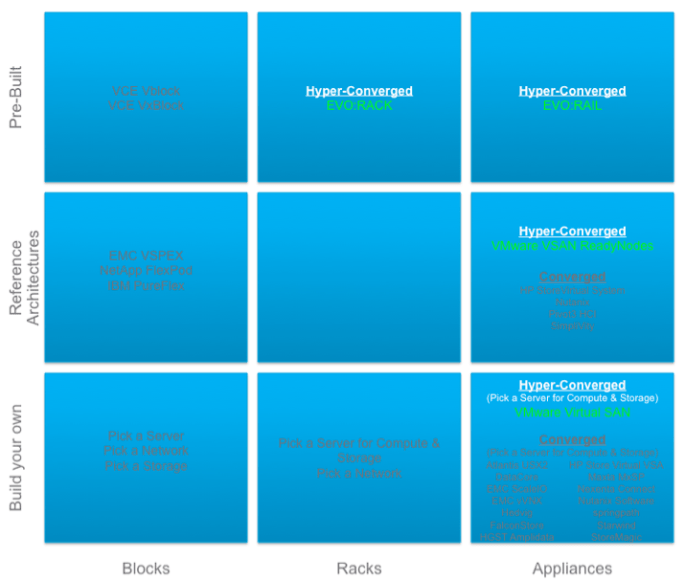
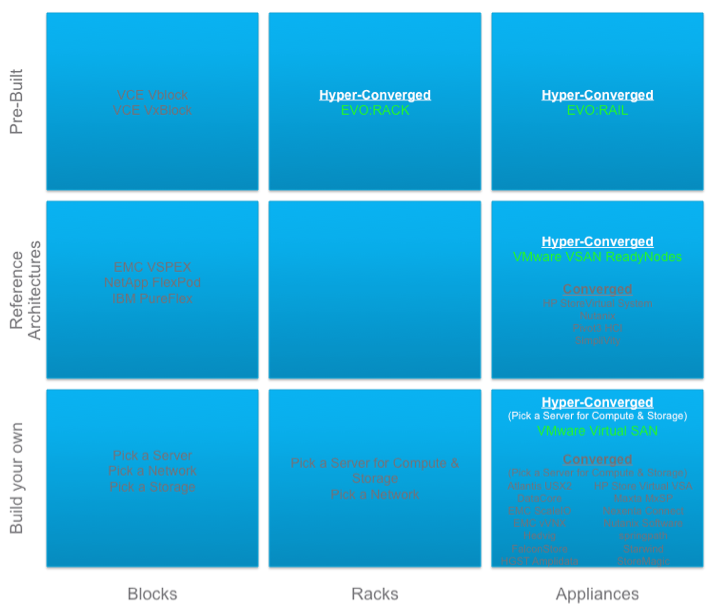
OK, lets review with a diagram I put together based on EMC’s recent definition of Blocks, Racks, and Appliances. See the Virtual Geek blog here for more info: EMC World Day 1: BLOCKS, RACKS, APPLIANCES.

Block, Rack, Appliance

Notice that the concept of Build your own converged infrastructure combining compute and storage on the same host is not unique. There are approximately 15 companies with this solution including VMware. It’s a crowded space. VMware Virtual SAN is unique here in that it’s the only one that is built into the hypervisor.

Next notice that the concept of Reference Architecture converged infrastructure is not unique. There are approximately 5 companies with this solution including VMware. VMware Virtual SAN is unique here in that it’s the only one that is built into the hypervisor.

Finally, notice that there is only 1 way to obtain Pre-Built converged infrastructure and that’s EVO:RAIL which uses the VMware Virtual SAN storage that is built into the hypervisor. All you need to do is rack it, cable it, power it on, and start consuming VM’s. Kind of like buying a cake from the bakery, getting a fork, and start eating it.

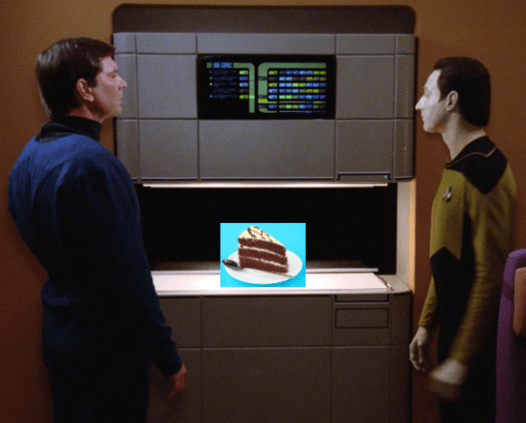
OK, one last analogy… today, if you need a Virtual Machine and even EVO:RAIL isn’t a quick enough way to get it, it’s possible to simply provision one on demand from a service provider like vCloud Air. Now, wouldn’t it be great if you could get a piece of cake on demand? How long until this becomes a reality?
Data cake

What Makes VSAN Different?

I had a question today asking how VMware Virtual SAN (VSAN) compares to XYZ company. There are over a dozen virtual machine software based solutions that leverage the local disks in ESXi hosts to present storage back to the hosts in the vSphere cluster. Those solutions require a vSphere cluster to be created then their virtual machine must be installed on every host to handle the storage services. Some are more efficient at this than others but there is always level of effort to “build-your-own” storage on top of the vSphere cluster and those virtual machines can take up significant host resources to deliver on the storage services they offer. So converged infrastructure itself is nothing new or unique. Its how it’s done that is important.

Here’s what makes VMware Virtual SAN (VSAN) different:

  • VSAN is the ONLY software defined storage solution that is embedded into the ESXi hypervisor making it the most efficient data path for performance.  VM’s send their data through the hypervisor right to disk, there’s no middle man.  In addition, VSAN is the most efficient in its use of the host resources to deliver on the storage service. VSAN is designed to take up no more than 10% of the host CPU and memory resources and testing with vSphere 6 show significantly less impact than that. Since VSAN is not a VM on top of the hypervisor, it has this distinct advantage. This was a positive tradeoff for the fact that VSAN is a VMware vSphere only solution.
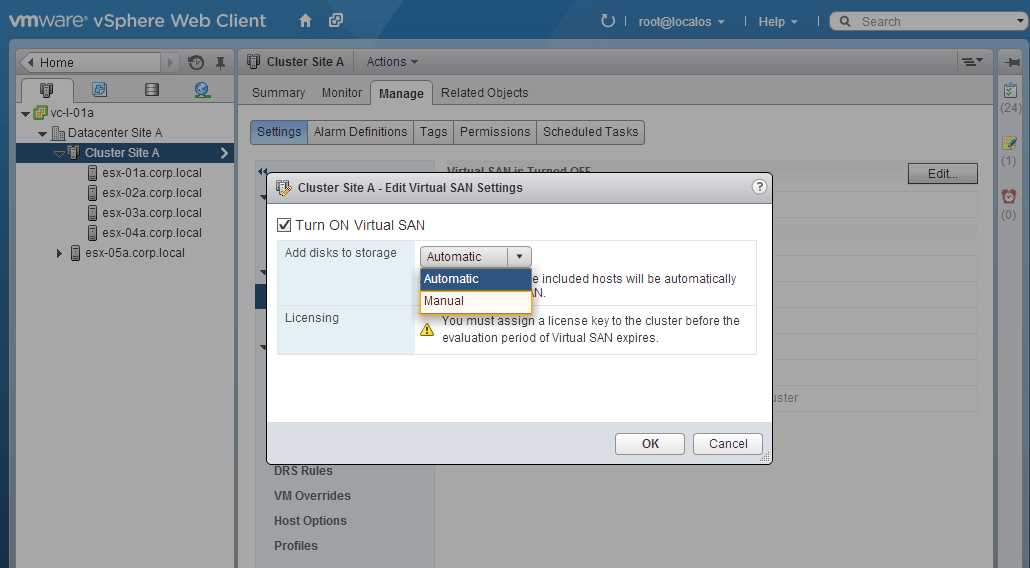
  • Being built in also makes it simple and easy to manage. There is no VSAN install, it is simply enabled as a feature of the hypervisor by clicking a check box. When enabled, VSAN will collect all the local disks on all the hosts and create the VSAN Datastore. Bear in mind, the server IO controller and disks must be in place and networking configurations must be completed to make sure VSAN will work when you click that check box.

VSAN Checkbox

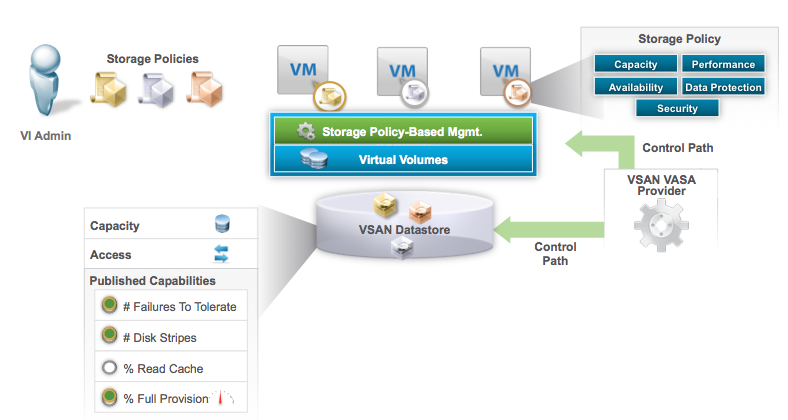
  • VSAN is fully integrated into VMware Storage Policy Based Management (SPBM), VASA, and VVOLs. When that check box is clicked, the VSAN datastore is created and it’s VASA provider is registered with vCenter to expose it’s capabilities to SPBM. This allows different policy to be created so the same pool of capacity can deliver different service levels to different VM’s based on performance, availability, and protection. When VM’s are attached to a policy service level, their VM objects get created on the VSAN datastore in the form of Virtual Volume (VVOL) objects. VSAN further breaks these VVOL objects up into components to deliver on the defined protection and performance service levels.

VSAN and SPBM

  • VSAN deals with data protection at the software layer so it doesn’t suffer the performance and capacity penalty of hardware RAID. Different “tiers” of protection can be defined by policy and set for different VM’s using the same pool of disks in the VSAN datastore.  Numbers of Failures to Tolerate settings determine how many data replicas are written to different hosts to deliver the desired protection level for VM’s.
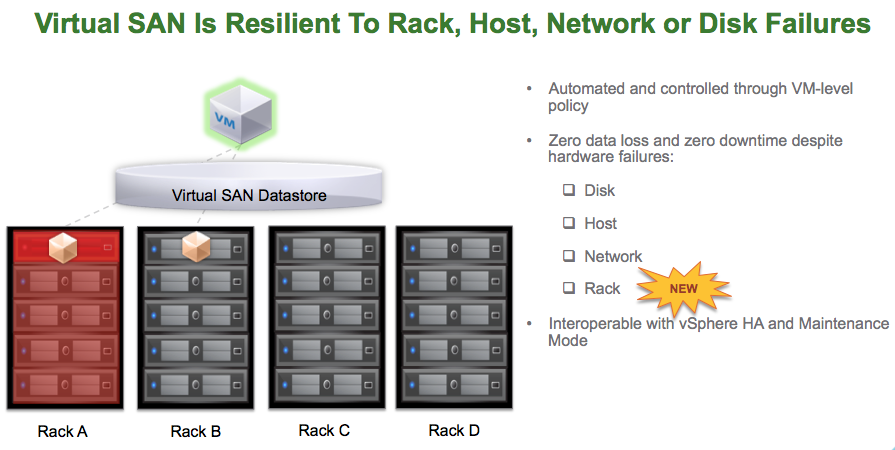
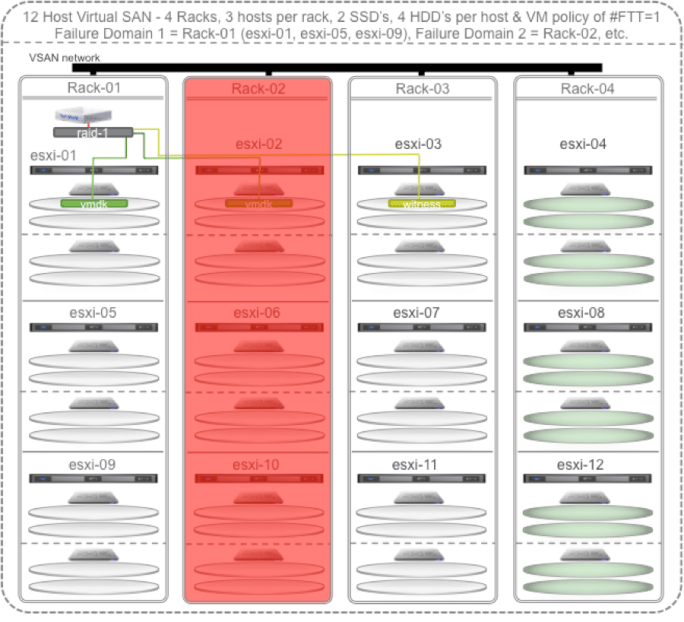
  • VSAN now supports a feature called “Rack Diversity”.  I wrote about the benefits here.  This brings Software Defined Self Healing with Failure Domains.  Hosts in the same rack can be placed into the same fault domain so that if an entire rack is lost then data remains available since another replica copy of the data resides on another host in another rack.

VSAN Rack Diversity

  • VSAN is a hybrid storage solution leveraging SSD as cache to accelerate both reads and writes and low cost high capacity hard disks to persist the data. This results in near All-Flash array performance at a fraction of the cost. With vSphere 6 along with Virtual SAN 6, an All-Flash VSAN is supported delivering extreme performance.

VMware Virtual SAN™ 6.0 Performance

  • VSAN is one of the few software based storage solutions that can leverage the in host SSD/Flash for Read AND Write caching. There are many solutions that can leverage in host SSD/Flash for read caching. Write back caching is more difficult to implement but VSAN does it while maintaining high availability of those writes across the cluster.

All other converged software based storage solutions require running a Virtual Machine on top of ESXi. So all VM’s have to go through their own IO path, through the hypervisor, then through that single VM IO path, then back through the hypervisor, then to the disks. In some cases, the disks themselves need to be setup with a hardware RAID configuration then their VM solution implements software RAID in addition to the underlying hardware RAID paying a double performance and capacity penalty. Each of these VM’s take on additional host CPU and Memory. Some require 2-4 vCPU’s and 16GB or more of RAM. And some are limited to the number of nodes they can scale to and how much total capacity can be supported. Again, some solutions are more efficient and scalable than others so do the homework and ask the right questions when comparing. Finally, most don’t support VMware’s Storage Policy Based Management which is the VMware framework for managing all vSphere storage going forward.

VMware’s vision for Virtual SAN is that it be the best storage solution for Virtual Machines. With the release of vSphere 6 and Virtual SAN 6, VMware is closer to that vision. There are many software defined storage choices out there.  Hopefully this helps in that decision making process.

Virtual SAN 6 – What Does a Maxed Out 64 Host VSAN Cluster Look Like?

The big VMware vSphere 6 launch was yesterday and along with it comes Virtual SAN (VSAN) 6. Here are a couple of good summaries:

Rawlinson Rivera – VMware Virtual SAN 6.0

What’s New: VMware Virtual SAN 6.0

The big news is that a vSphere cluster will now scale to 64 hosts and thus VSAN will too. So what does that look like fully scaled up and out with the maximum hosts, maximum disk groups, and maximum disks per disk group? By the way, for details on how VSAN scales up and out check Is Virtual SAN (VSAN) Scale Up or Scale Out Storage…, Yes!.

Virtual SAN (VSAN) Enabled vSphere Cluster Scaled Up and Out to 64 hosts (nodes).

64 host VSAN

Oh yea, the overall VSAN performance is significantly improved. Plus with double the number of hosts that doubles the performance. In addition, VSAN now supports an All-Flash configuration that even further increases the performance.

Virtual SAN 6 Rack Awareness – Software Defined Self Healing with Failure Domains

I continue to think one of the hidden gem features of VMware Virtual SAN (VSAN) is it’s software defined self healing ability. I wrote about it a few months back here in: Virtual SAN Software Defined Self Healing

Since Virtual SAN is such a different way to do storage, it allows for some interesting configuration combinations. With vSphere 6 (built into vSphere 6), VMware will be introducing a new add-on feature for Virtual SAN called “Rack Awareness” accomplished by creating multiple “Failure Domains” and placing hosts in the same rack into the same Failure Domain. This “Rack Awareness” feature exploits the # Failures To Tolerate policy of Virtual SAN.

The rest of this post will look a lot like the previous post I did on self healing but will translate it for the Rack Awareness feature.

Minimum Rack Awareness Configuration

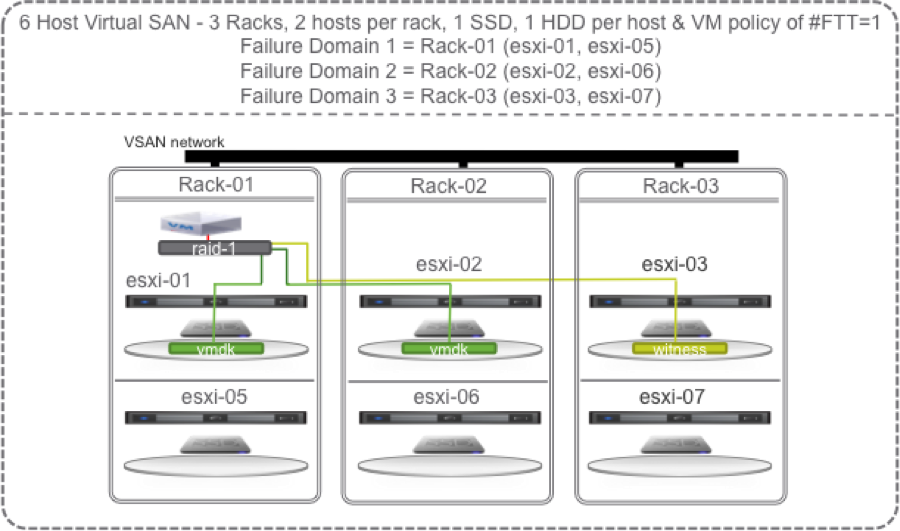
Lets start with the smallest VSAN “Rack Awareness” configuration possible that provides redundancy: a 3 rack, 6 host (2 per rack) vSphere cluster with VSAN enabled and 1 SSD and 1 HDD per host. In VSAN, an SSD constitutes a disk group so the 1 HDD is placed into a Disk Group with the 1 SSD. The SSD performs the write and read caching for the HDD’s in its disk group. The HDD permanently stores the data.

Lets start with a single VM with the default # Failures To Tolerate (#FTT) equal to 1. A VM has at least 3 objects (namespace, swap, vmdk). Each object has 3 components (data 1, data 2, witness) to satisfy #FTT=1. Lets just focus on the vmdk object and say that the VM sits on host 1 with replicas/mirrors/copies (these terms can be used interchangeably) of its vmdk data on host 1 in rack 1 and host 2 in rack 2 and the witness on host 3 in rack 3. The rule in Virtual SAN is that each of these three components of an object (data 1, data 2, witness) must sit on different hosts. With Rack Awareness, they also must be in different hosts in different racks.

RackAware01

OK, lets start causing some trouble. With the default # Failures To Tolerate equal 1, VM data on VSAN should be available if a single SSD, a single HDD, a single host fails, or an entire rack fails.

Continue reading “Virtual SAN 6 Rack Awareness – Software Defined Self Healing with Failure Domains”