What Makes EVO:RAIL Different

EVO:RAIL is the only Hyper-Converged solution that ships Pre-Built with VMware software and is ready to deploy VM’s when it arrives. There, that’s it.

OK, maybe you want more detail than that.

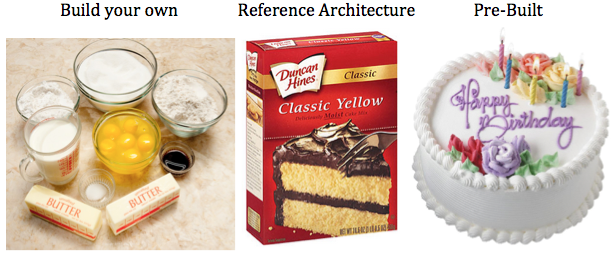
This analogy has been used before but it’s worth repeating for those who haven’t heard it before. This comes from my days as a vSpecialist at EMC. If you want a cake, you have 3 primary options.
cake

The first way to get a cake is you Build your own. You purchase the ingredients (flour, eggs, milk, etc.), you measure the quantities you think you need, mix them together, and make a cake. The second time you make one it might be a bit better based on some lessons learned. Eventually, if you do it enough, you’ll probably get pretty good at it.

The second way to get a cake is to buy a Reference Architecture. This is a specific set of pre-measured ingredients that you buy, but you still have to make it. You open the box, add eggs and water to the mix and the end result is a cake. If you make another, it’ll probably be pretty similar to the last one.

The third option is you go to a bakery and buy a cake. It’s professionally made and ready to eat. And if you want another one just like it, your favorite bakery can reproduce it and get it to you pretty quickly.

Lets now shift this analogy to data center infrastructure. The first way to get data center infrastructure is to build your own (i.e. bake a cake). Purchase your favorite servers, network switches, and storage system, connect them together, configure them, install VMware software, and eventually you’ll have a place to provision virtual machines. The next time you need to build out infrastructure you’ll likely be able to do it a bit faster, with less configuration errors, and have it run more optimally based on some lessons learned. Eventually, if you do it enough you’ll get pretty good at it.

The second way to get data center infrastructure is to purchase a prepackaged reference architecture solution, but you still have to make it (i.e. cake mix). You get the hardware, connect it to the network, install VMware software, and you have infrastructure. The performance is fairly predictable since the hardware was chosen to meet a certain workload profile.

The third option to get data center infrastructure is to purchase a pre-built solution (i.e. bakery). And this is where EVO:RAIL is different. There are only 3 ways I know of to purchase infrastructure pre-built with VMware software that is ready to provision VM’s when they arrive. The first way that emerged several years ago is VCE Vblock or VxBlock. The second way now available is the Hyper-converged EVO:RAIL from an Qualified EVO:RAIL Partner (Dell, EMC, Fujitsu, HP, Hitachi, inspur, NetApp, netone, and SuperMicro). Receive the system, power it on, and start provisioning VM’s since its already running the VMware software you need to do so. The third way is EVO:RACK which is currently available as a tech-preview from a few Qualified EVO:RACK Partners. More information is available here: EVO: RACK Tech Preview at VMworld 2014

That’s it, no one else, without a specific agreement to do so, can ship hardware pre-built with VMware software, just VCE and Qualified EVO:RAIL and EVO:RACK Partners. All other “converged infrastructure” solutions, require you to obtain the hardware (either by picking and choosing components yourself, or by going with a reference architecture). None of them are able to arrive with VMware software already installed. Once the hardware arrives the VMware software must be installed first. And in the case of all other “converged” infrastructure solutions other than VMware Virtual SAN, you must install the storage software on top of vSphere. VI wrote about this here: What Makes VSAN Different?

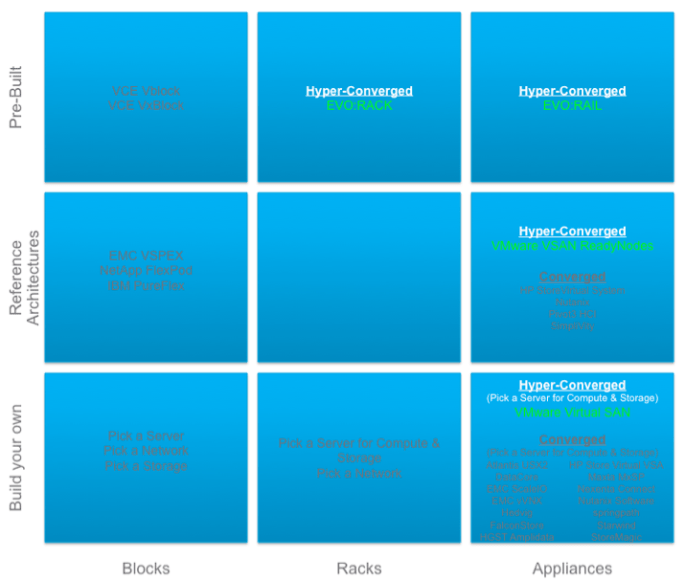
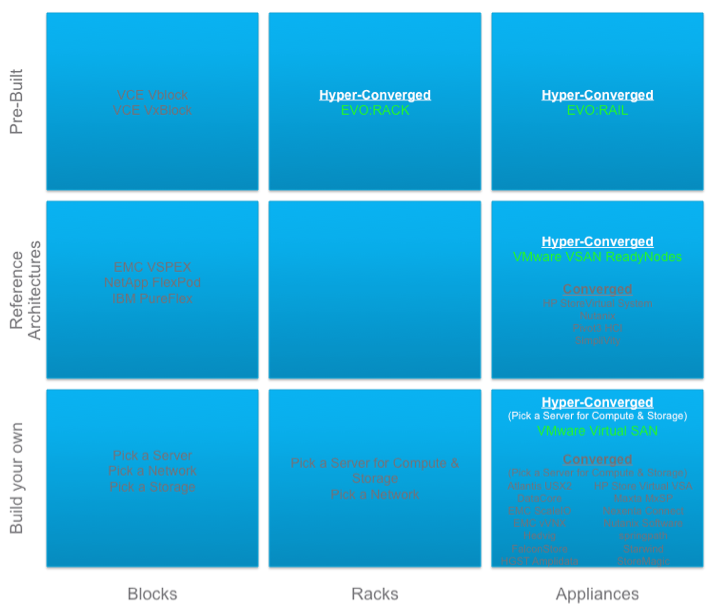
OK, lets review with a diagram I put together based on EMC’s recent definition of Blocks, Racks, and Appliances. See the Virtual Geek blog here for more info: EMC World Day 1: BLOCKS, RACKS, APPLIANCES.
Block, Rack, Appliance

Notice that the concept of Build your own converged infrastructure combining compute and storage on the same host is not unique. There are approximately 15 companies with this solution including VMware. It’s a crowded space. VMware Virtual SAN is unique here in that it’s the only one that is built into the hypervisor.

Next notice that the concept of Reference Architecture converged infrastructure is not unique. There are approximately 5 companies with this solution including VMware. VMware Virtual SAN is unique here in that it’s the only one that is built into the hypervisor.

Finally, notice that there is only 1 way to obtain Pre-Built converged infrastructure and that’s EVO:RAIL which uses the VMware Virtual SAN storage that is built into the hypervisor. All you need to do is rack it, cable it, power it on, and start consuming VM’s. Kind of like buying a cake from the bakery, getting a fork, and start eating it.

OK, one last analogy… today, if you need a Virtual Machine and even EVO:RAIL isn’t a quick enough way to get it, it’s possible to simply provision one on demand from a service provider like vCloud Air. Now, wouldn’t it be great if you could get a piece of cake on demand? How long until this becomes a reality?

Data cake

Mission Accomplished – 2015 vExpert

I received my official letter today that I was welcomed into the 2015 vExpert Program.  With this livevirtually blog I set out to post answers to questions people asked me that I thought would be useful to others in the community. To be recognized for this effort is rewarding and I am grateful for it.  Thank you!  Now I just need to keep doing it and I plan to.  Click the badge below for the official announcement and full list of the many talented members of the 2015 vExpert community:

vExpert-2015-Badge

Virtual SAN 6 – What Does a Maxed Out 64 Host VSAN Cluster Look Like?

The big VMware vSphere 6 launch was yesterday and along with it comes Virtual SAN (VSAN) 6. Here are a couple of good summaries:

Rawlinson Rivera – VMware Virtual SAN 6.0

What’s New: VMware Virtual SAN 6.0

The big news is that a vSphere cluster will now scale to 64 hosts and thus VSAN will too. So what does that look like fully scaled up and out with the maximum hosts, maximum disk groups, and maximum disks per disk group? By the way, for details on how VSAN scales up and out check Is Virtual SAN (VSAN) Scale Up or Scale Out Storage…, Yes!.

Virtual SAN (VSAN) Enabled vSphere Cluster Scaled Up and Out to 64 hosts (nodes).

64 host VSAN

Oh yea, the overall VSAN performance is significantly improved. Plus with double the number of hosts that doubles the performance. In addition, VSAN now supports an All-Flash configuration that even further increases the performance.

VMware Jobs!!! – Software Defined Storage (Virtual SAN, EVO:RAIL, etc.)

I’ve been at VMware for 1.5 years and have had a blast talking to customers, partners, and VMware employees about all things software defined storage. This primarily involves Virtual SAN & EVO:RAIL which take advantage of VASA, Storage Policy Based Management, and VVOLS. Because we are talking about storage it also includes discussing the benefits of vSphere Replication, Site Recovery Manager, and vSphere Data Protection. Basically, anything to do with storing, protecting, and managing Virtual Machine data.  Its exciting to be part of the whole software defined data center strategy.

We are growing our Software Defined Storage team and are looking for qualified rockstars. If you are one, and the topics above are familiar to you, and you are interested in joining the VMware Software Defined Storage Team, then check out the openings below.  Feel free to apply directly or reach out to me with any questions at: pkeilty at vmware dot com

You can find the openings on the VMware Public Job Page: http://vmware.jobs/

Plug in the Requisition Number below to find more details on the openings and full job descriptions:

Systems Engineers

  • Requisition Number 55635BR – Sr. Systems Engineer-Software Defined Storage-East in New York New York United States

We are also looking for SE’s in the Ohio Valley and South East USA. In addition, we are looking for a Technical Field SE in the East. These jobs Requisitions will be posted soon.

Sales

  • Requisition Number 58265BR – Storage Account Executive in Austin Texas United States
  • Requisition Number 58420BR – Storage Account Executive – Federal in Reston Virginia United States
  • Requisition Number 58501BR – Sales Leader, Software Defined Storage – Palo Alto or Austin in Austin Texas United States
  • Requisition 58504BR – Inside Sales Representative, Software Defined Storage in Austin Texas United States

Good luck!

VMware Software Defined Storage and Virtual SAN at PEX

Unfortunately I won’t be attending VMware PEX this year.  Its a great event to meet up with our great VMware partners and learn the latest VMware tech.  There will be tons of Software Defined goodness, specifically, here is a great link to all the storage stuff:

Discover Software-Defined Storage & VMware Virtual SAN at PEX 2015!


Best Practice for Preparing Hardware for a Virtual SAN Deployment

This may be stating the obvious but I think it’s worth repeating. Before building a Virtual SAN enabled cluster make sure:

  • The server hardware is updated to the latest and greatest system ROM / BIOS / firmware
  • The IO Controller is running the latest firmware
  • The SSD are running the latest firmware
  • The HDD are running the latest firmware

These firmware updates often resolve some important hardware issues.

Next, make sure you follow the Performance Best Practices for VMware vSphere® 5.5

  • Specifically, make sure Power Management BIOS Settings are disabled in the server BIOS (see page 17)

Once ESXi is installed on the host

  • Make sure the IO Controller is loading the correct version of the device driver.  You can look this up on the Virtual SAN HCL

I work with a lot of customers who are evaluating or implementing Virtual SAN and following these simple, obvious, but important best practices have led to better performance and a better overall experience with Virtual SAN.

XvMotion, Cross-vCenter vMotion, VVols, LVM active/active, LVM active/passive, SRM & Stretched Storage, VAIO Filters

Recently, with the announcement of the availability of VVols in vSphere.NEXT I was asked to give a deep dive presentation to a customer with a focus on what VVols meant for protection VM’s. While at EMC as a vSpecialist I lead a group focused on protecting VM’s so this is something I’ve been interested in for awhile. I’m a big fan of RecoverPoint and am excited about virtual RecoverPoint’s ability to offer continuous data protection for VSAN as I indicated here.   I’m also a huge fan of VPLEX and spent a lot of time during my days at EMC discussing what it could do. The more I dug into what VVols could do to help with various VM movement and data protection schemes the more I realized there was much to be excited about but also much need for clarification. So, after some research, phone calls, and email exchanges with people in the know I gathered the information and felt it would be good information to share.

What follows is kind of a “everything but the kitchen sink” post on various ways to move and protect VM’s. There were several pieces of the puzzle to put together so here are the past, present, and future options.

XvMotion (Enhanced vMotion) – vMotion without shared storage – Released in vSphere 5.1

In vSphere 5.1 VMware eliminated the shared storage requirement of vMotion.

  • vMotion – vMotion can be used to non-disruptively move a VM from one host to another host provided both hosts have access to the same shared storage (i.e. A datastore backed by a LUN or volume on a storage array or shared storage device). Prior to vSphere 5.1 this was the only option to non-disruptively move a VM between hosts.
  • Storage vMotion – this allows VM vmdk’s to be non-disruptively moved from one datastore to another datastore provided the host has access to both.
  • XvMotion – As of vSphere 5.1. XvMotion allows a VM on one host, regardless of the storage it is using, to be non-disruptively moved to another host, regardless of the storage it is using. Shared storage is no longer a requirement. The data is moved through the vMotion network. This was a major step towards VM mobility freedom, especially when you think of moving workloads in and out of the cloud.
  • For more information see: Requirements and Limitations for vMotion Without Shared Storage

Cross-vCenter vMotion – Announced at VMworld 2014, available in vSphere.NEXT (future release)

This new feature was announced during the VMworld 2014 US – General Session – Tuesday.

Continue reading “XvMotion, Cross-vCenter vMotion, VVols, LVM active/active, LVM active/passive, SRM & Stretched Storage, VAIO Filters”

“Virtualization and Cloud Are Here to Stay” PC Connection podcast series – VMware Software Defined Storage and Virtual SAN

This is another fun short project I was fortunate enough to be involved in with a great VMware partner, PC Connection.

VMware Software Defined Storage and Virtual SAN

This is part of their “Virtualization and Cloud Are Here to Stay” podcast series.  Thanks to PC Connection for letting me be a part of it.


Quick discussion on VVols

One of the big topics at VMworld 2014 was VVols.  VMware announced it will be part of the next release of vSphere and almost every storage vendor on the planet is excited about the benefits that VVols bring.  I was working the VVol booth at VMworld and had the pleasure of being interviewed by VMworld TV to discuss the comparison between VSAN and VVols.  This was fun but unscripted and off the cuff so here it is:

VMworld TV Interview: Peter Keilty of VMware Discussed Virtual Volumes

What I’m trying to say is:

  • VSAN is the first supported storage solution takes advantage of VVols.
  • VVols, in vSphere.NEXT, will work in conjunction with VASA to allow all block and file based storage arrays to fully realize the benefits of Storage Policy Based Management (SPBM).
  • Each storage vendor can write a VASA/VVol provider that registers with vCenter to integrate with the vSphere API’s and promote their storage capabilities to vCenter. I expect just about every storage array vendor to do this.  I have seen VVol demonstrations by EMC, NetApp, Dell, HP, and IBM.
  • VVols eliminates the requirements of creating LUNs or Volumes on the arrays, instead, arrays present a pool or multiple pools of capacity in the form of storage containers that the hosts in the cluster see as datastores
  • Through SPBM, administrators can create different service levels in the form of policy that can be satisfied by the underlying storage provider container.
  • When VM’s get provisioned, they get assigned to a policy, and their objects (namespace, swap, vmdk’s, snap/clones) get placed as native objects into the container in the form of VVols.
  • You can even assign objects from the same VM to different policy to give them different service levels, all potentially satisfied by the same storage provider or perhaps different provider containers.  In other words, a vmdk for an OS image might want dedupe enabled but a vmdk for a database might not want dedupe but might want cache acceleration.  Different policy can be set and each object can be assigned to the policy that will deliver the desired service level.  The objects could be placed into the same storage array pool but taking advantage of different storage array features.  And these can be changed on the fly as needed.

Like all the storage vendors out there, I’m very excited about the benefits of VVols.  For a full description and deep dive check out this awesome VMworld session by Rawlinson Rivera (http://www.punchingclouds.com/) and Suzy Visvanathan:

Virtual Volumes Technical Deep Dive

VSAN Sessions at VMworld 2014

I’m really looking forward to attending VMworld 2014 in a few weeks.  Its a great time to catch up with friends and meet new ones.  For me the week kicks off on Thursday at the VMware SE Tech Summit.  Then vOdgeball on Sunday afternoon with a team of former EMC vSpecialists.  This is a great event to help out a great cause, the Wounded Warrior Project.  We’ll also be honoring our two vSpecialist friends, Jim Ruddy and Stephen Hunt, that were recently involved in a tragic accident.  Then the main event starts Sunday night.  It should be fun and exhausting.

Virtual SAN (VSAN) is sure to be one of the highlights of the show.

Continue reading “VSAN Sessions at VMworld 2014”
