Virtual SAN Disaster Recovery – vSphere Replication (available now) or Virtual RecoverPoint (coming soon), choose your protection!

I’m often asked how to protect Virtual SAN (VSAN). Its simple, any product focused on protecting a virtual machine (VM) will work for protecting VM’s sitting on a VSAN enabled vSphere cluster. VMware offers VDP/VDPA for backup & recovery and there are many other VMware partners with backup & recovery solutions focused on protecting VM’s. Backup & Recovery is a great way to protect data but some customers like the benefit of more granular recovery points that comes from data replication either locally or to a disaster recovery site.

To protect VSAN data in a primary site to a remote disaster recovery site VMware offers vSphere Replication (VR) to replicate the VM data sitting on a VSAN Datastore over the DR site. Of course Site Recovery Manager (SRM) is supported to automate failover, failback and testing. The VR/SRM combined solution can also be used for planned data center migrations. Here are a few great write-ups on the topics:

VMware Virtual SAN Interoperability: vSphere Replication and vCenter Site Recovery Manager

Virtual SAN Interoperability – Planned migration with vSphere Replication and SRM

VSAN and vSphere Replication Interop

One of the main benefits of VR is that it will work to replicate VM data on any storage to another site with hosts connected to any other storage. So, VSAN can be the source, the target, or both.
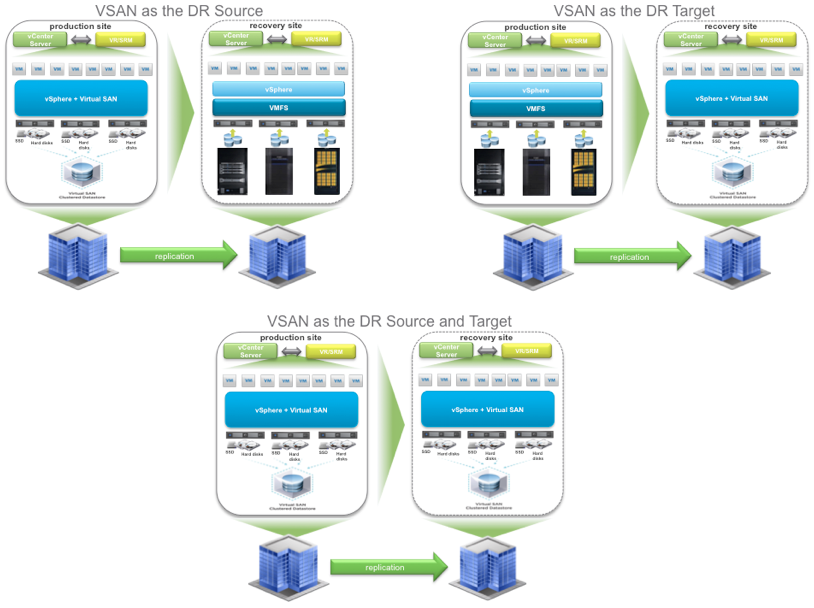
VSAN & VR


vSphere Replication can be set to asynchronously replicate every day, hour, or up to every 15 minutes. Thus providing a Recovery Point Objective (RPO) of up to 15 minutes. For many customers, this is “good enough”. For some customer workloads, asynchronous replication is not “good enough”. They need synchronous replication protection and there are several solutions in the market. One that I’ve been a big fan of for a long time is EMC’s RecoverPoint which has a great reputation for protecting enterprise mission critical data and applications.  Essentially it splits every write transaction, journals it, and synchronously makes a copy of it either locally or to a remote DR site without impacting application performance. Of course there are more details but this is essentially what it does which results in being able to recover back to any point in time. Often it’s labeled as “Tivo or DVR for the data center”. One other benefit of RecoverPoint is it can replicate data from any storage to any storage, as long as there is a splitter for the storage. EMC VNX and VMAX storage arrays have splitters built in.

The big news that just came out last week that peeked my interest is that EMC is now offering a Beta of a completely software based RecoverPoint solution that embeds the splitter into vSphere. This brings the RecoverPoint benefits to any VMware customer running VM’s on any storage: block, file, or of course even VSAN. The EMC initiative is call Project Mercury and for more information check out:

Summer Gift Part 1 – Project Mercury Beta Open!

I’m excited that VSAN customers will have a choice for data protection, asynchronously with 15 minute RPO using vSphere Replication or continuous, synchronous, and asynchronous with EMC’s Virtual RecoverPoint.
Montreal Loves VSAN!

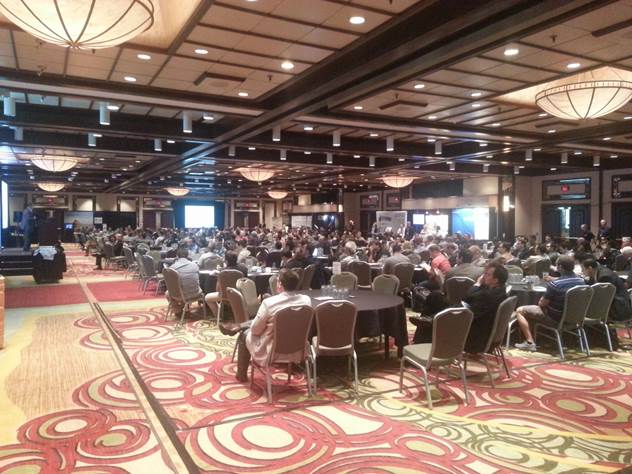
Last week I had the good fortune to support the Montreal VMware vForum.  There were over 418 participants and 21 partner booths.  A packed house at the Hilton Montreal Bonaventure which was a great facility.

MontrealForum1

There were multiple keynote presentations throughout the day as well as break out sessions on a wide variety of topics.  In the morning session I was able to share the benefits of VSAN to the entire crowd and let everyone know about the Hands on Lab we setup for attendees to try out VSAN.


We setup 10 Chromebook workstations that were occupied the whole day.  A total of 86 customers took the VSAN lab and the feedback was overwhelmingly positive.  Both about VSAN and the fact that we made the labs available during the day.

MontrealForumVSANlab

At the end of the day there was an after party during which we gave away the Chromebooks to lucky winners while everyone was enjoying their favorite beverage.

A special thanks to our VMware friends, partners, and especially customers for helping make this a great day!  Montreal is a great city and now we know Montreal Loves VSAN!

I look forward to the next big event: Boston VMUG User Conference.

EMC & VMware SE Interlock & EMC World 2014 Hands On Lab for VSAN

Over the past few months I’ve had the pleasure of speaking to the various EMC SE teams in the North East and Mid-Atlantic regions.  Since VSAN is now GA, its important to understand where VSAN fits in the market compared to EMC solutions.  I should point out that I’d be happy to have the same conversation with other storage vendors.  That’s the beauty of the “Federation” between EMC II, Pivotal, VMware, and RSA.  Each individual company is free to work with the competitors of the other members of the federation. But, they also want to make sure they work with each other as closely as anyone.  Kind of like when VMware opened up the API’s to vSphere and EMC made sure they were the most integrated with them… so EMC is now making sure their SE’s are the most up to date on VMware’s latest storage offerings.  VSAN is a great solution, I’m am swamped with customer requests to hear more about it, but it is not necessarily going to replace all storage solutions in a data center for all workloads.  Customers are identifying use cases that fit best for them where VSAN offeres better cost/performance/operational benefits.  The VSAN message has been well received by the EMC teams and I look forward to working closely together.

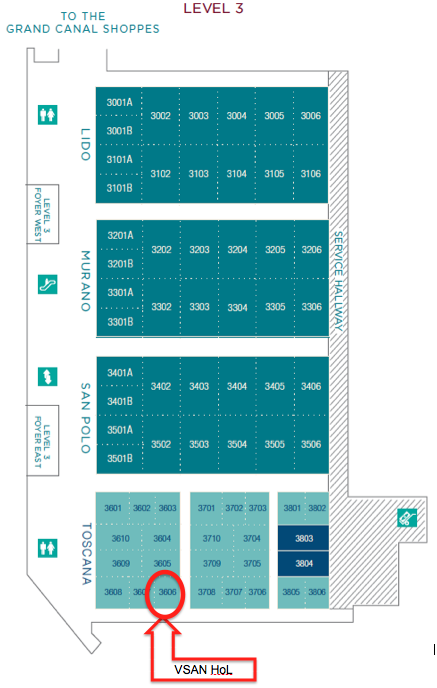
On that note, I’m attending EMC World 2014 this week.  The VMware VSAN team is setting up a Hands On Lab where you can get your hands on the technology.  Chuck Hollis has the details here:

http://chucksblog.emc.com/chucks_blog/2014/04/vsan-hands-on-at-emc-world.html

I wanted to make sure you know where to go so here’s the map to the location.

Screen Shot 2014-05-03 at 9.22.41 PM

Also, here’s a link to the Chromebooks that we’ll be using and then giving away at Wednesday night.

http://www.samsung.com/us/computer/chrome-os-devices/XE303C12-A01US

Looking forward to seeing you all there.

What is the RAW to Usable capacity in Virtual SAN (VSAN)?

I get asked this question a lot so in the spirit of this blog it was about time to write it up.

The only correct answer is “it depends”. Typically, the RAW to usable ratio is 2:1 (i.e. 50%). By default, 1TB RAW capacity equates to approximately 500GB usable capacity. Read on for more details.

In VSAN there are two choices that impact RAW to usable capacity. One is the protection level and the other is the Object Space Reservation (%). Lets start with protection.

Virtual SAN (VSAN) does not use hardware RAID (Disclaimer at the end). Thus, it does not suffer the capacity, performance, or management overhead penalty of hardware RAID. The raw capacity of the local disks on a host are presented to the ESXi hypervisor and when VSAN is enabled in the cluster the local disks are put into a shared pool that is presented to the cluster as a VSAN Datastore. To protect VM’s, VSAN implements software distributed RAID leveraging the disks in the VSAN Datastore. This is defined by setting policy. You can have different protection levels for different policies (Gold, Silver, Bronze) all satisfied by the same VSAN Datastore.

The VSAN protection policy setting is “Number of Failures to Tolerate (#FTT) and can be set to 0, 1, 2, 3. The default is #FTT=1 which means using distributed software RAID there will be 2 (#FTT+1) copies of the data on two different hosts in the cluster. So if the VM is 100GB then it takes 200GB of VSAN capacity to satisfy the protection. This would be analogous to RAID 1 on a storage array. But rather than writing to a disk then to another disk in the same host we write to another disk on another host in the cluster. With #FTT=1, VSAN can tolerate a single SSD failure, a single HDD failure, or a single host failure and maintain access to data. Valid settings for #FTT are 0, 1, 2, 3. If set to 3 then there will be 4 copies of the VM data thus RAW to usable would be 25%. In addition, there is a small formatting overhead (couple of MB) on each disk but is negligible in the grand scheme of things.

#FTT # Copies
(#FTT+1)
RAW-to-usable Capacity %
0 1 100%
1 2 50%
2 3 33%
3 4 25%

Perhaps you create the following policies with the specified #FTT:

  • Bronze with #FTT=0 (thus no failure protection)
  • Silver policy with #FTT=1 (default software RAID 1 protection)
  • Gold policy with #FTT=2 (able to maintain availability in the event of a double disk drive failure, double SSD failure, or double host failure)
  • Platinum policy with #FTT=3 (4 copies of the data).

Your RAW to useable capacity will depend on how many VM’s you place in the different policies and how much capacity each VM is allocated and consumes. Which brings us to the Object Space Reservation (%) discussion.

In VSAN, different policy can have different Object Space Reservation (%) (Full Provisioned percentages) associated with them. By default, all VM’s are thin provisioned thus 0% reservation. You can choose to fully provision any % up to 100%. If you create a VM that is put into a policy with Object Space Reservation equal to 50% and give it 500GB then initially it will consume 250GB out of the VSAN Datastore. If you leave the default of 0% reservation then it will not consume any capacity out of the VSAN Datastore but as data is written it will consume capacity per the protection level policy defined and described above.

That ended up being a longer write up than I anticipated but as you can see, it truly does depend. I suggest sticking to the rule of thumb of 50% RAW to usable. But if you are looking for exact RAW to usable capacity calculations you can refer to the VMware Virtual SAN Design and Sizing Guide found here. https://blogs.vmware.com/vsphere/2014/03/vmware-virtual-san-design-sizing-guide.html
Also, you can check out Duncan Epping’s Virtual SAN Datastore Calculator: http://vmwa.re/vsancalc

Disclaimer at the end: ESXi hosts require IO Controllers to present local disk for use in VSAN. The compatible controllers are found on the VSAN HCL here: http://www.vmware.com/resources/compatibility/search.php?deviceCategory=vsan

These controllers work in one of two modes; passthrough or RAID 0. In passthrough mode the RAW disks are presented to the ESXi hypervisor. In RAID 0 mode each disk needs to be placed in its own RAID 0 disk group and made available as local disks to the hypervisor. The exact RAID 0 configuration steps are dependent on the server and IO Controller vendor. Once each disk is placed in their own RAID 0 disk group you will then need to login via SSH to each of your ESXi hosts and run commands to ensure that the HDD’s are seen as “local” disks by Virtual SAN and that the SSD’s are seen as “local” and “SSD”.

I hope this is helpful. Of course questions and feedback is welcome.

What does a 32 host Virtual SAN (VSAN) Cluster Look Like?

The big VMware Virtual SAN (VSAN) launch was today. Here are a couple of good summaries:

Cormac Hogan – Virtual SAN (VSAN) Announcement Review

Duncan Epping – VMware Virtual SAN launch and book pre-announcement!

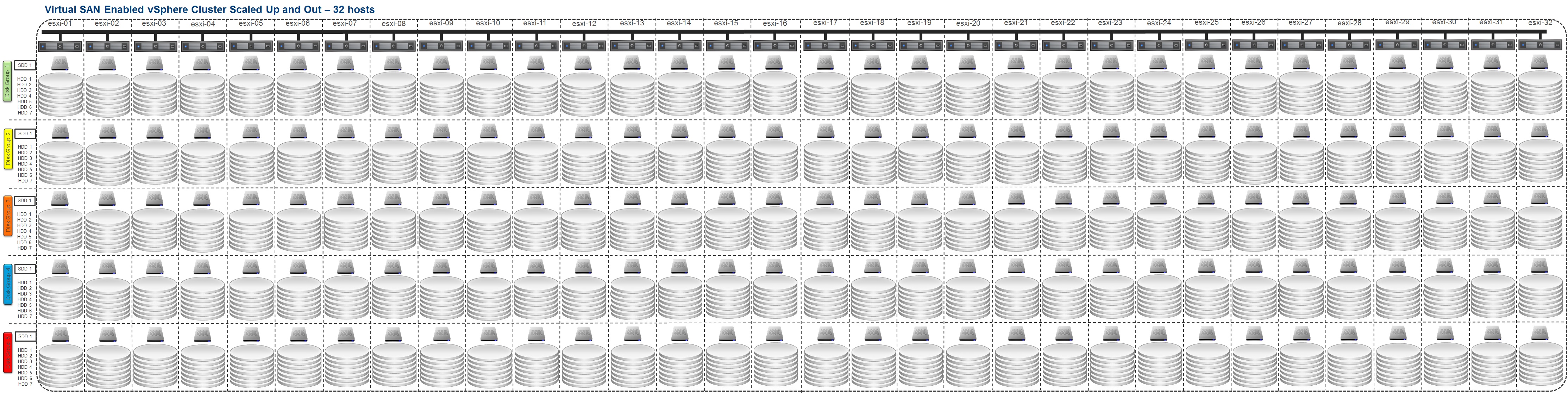
The big news is that VSAN will support a full 32 hosts vSphere cluster. So what does that look like fully scaled up and out?

VSAN - 32 Hosts

By the way, for details on how VSAN scales up and out check: Is Virtual SAN (VSAN) Scale Up or Scale Out Storage…, Yes!.

2 Great Bootcamps coming up at VMware Partner Exchange – PEX 2014

SDDC3522-BC – Software-Defined Storage Technical Boot Camp

This session will be all day on Saturday 2/8/2014 starting at 8:30AM.  I will be presenting the SDDC and VSAN overview as well as the vSphere Flash Read Cache Technical Presentation.  The technical deep dive on VSAN will be presented by Wade Holmes and a few other guest speakers.  Wade has authored a couple of the Hardware Configuration guidance blogs on SSD and IO Controllers and has been feverishly testing VSAN in all sorts of configurations in preparation for product launch.  I’m excited about the technical depth that Wade will go into and know our partners will get a ton of good information out of this session.  In addition, one of our engineers, Joe Cook, has been working with a bunch of customers to implement VSAN.  He will share the processes he’s been using for Proof of Concepts as well as present how to monitor and troubleshoot VSAN.  As a bonus, he’ll share a new tool that we’ve developed to help our partners analyze customer environments in preparation for VSAN and other VMware technologies. 

3579-SPO – EMC’s Game Changing Solution Roadmaps, Resources & Partner Programs

This session will be all day Monday 2/10/2014 starting at 8:30AM.  Prior to my current position as a Software Defined Storage SE for VMware I was an EMC vSpecialist for almost 4 years.  So this session is near and dear to my heart.  I just sat through the EMC Elect PEX planning concall and saw the full agenda for this one.  Lots of great presenter’s including of course Chad Sakic, Jason Nash, Aaron Chaisson, Rob Peglar, Brian Whitman, and others.  Chad will kick things off but you’ll need to download the NDA form from the PEX schedule builder and bring the signed copy in order to get into the session.

Continue reading “2 Great Bootcamps coming up at VMware Partner Exchange – PEX 2014”

Virtual SAN (VSAN) Beta, now 17% larger!

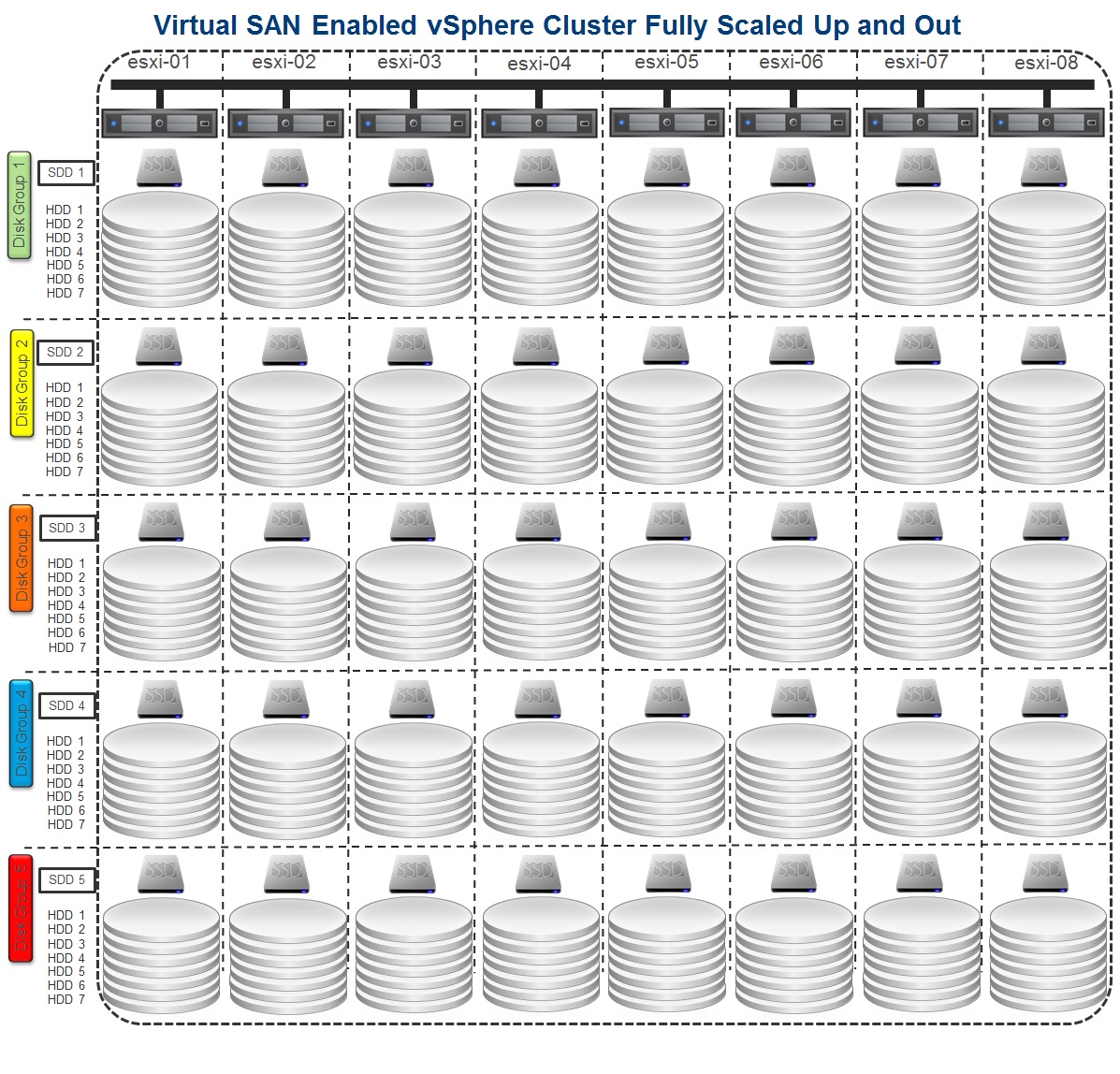
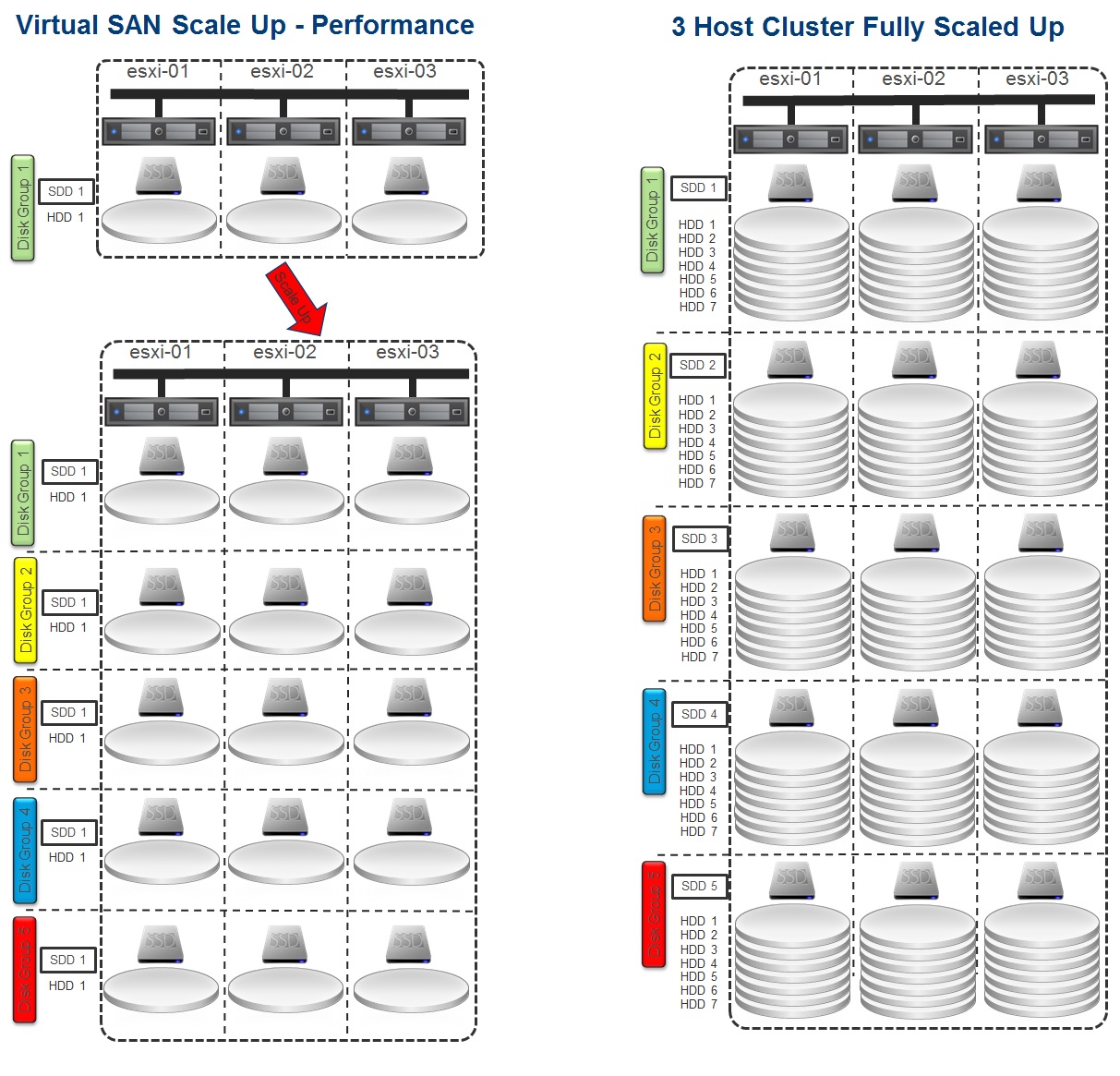
In a previous post here I detailed the Scale Up and Scale Out capabilities of VSAN.  It looks like I’ll need to redo my diagrams since Virtual SAN just increased the number of HDDs in a disk group from 6 to 7.  That’s a 17% increase in RAW capacity.  The number of SSD’s remain 1 per disk group, 5 per host, 40 per 8 host cluster.  With the increase from 6 to 7 HDD’s per disk group you can now have 35 HDD’s per host and in an 8 host cluster an increase from 240 to 280 HDD’s.  That’s an extra 40 HDD’s which translates to a ton of extra RAW capacity.

Virtual SAN Enabled vSphere Cluster Fully Scaled Up and Out 2

To support this increase you’ll need to download the recently released VSAN Beta code found on the VMware Virtual SAN Community page.

Also check out this great post on Virtual SAN – Sizing Considerations.

Is Virtual SAN (VSAN) Scale Up or Scale Out Storage…, Yes!

This may not be the most sophisticated definition but Scale Up storage means you buy a box with a certain amount of storage capacity and performance then sometime later you add more storage (HDD or SSD) to it to increased both capacity and IOPS performance.  Scale Out means you buy a box then sometime later add more boxes to increase both capacity and IOPS performance.  VMware Virtual SAN is both.  You have options to Scale Out as well as Scale Up.  Lets investigate.

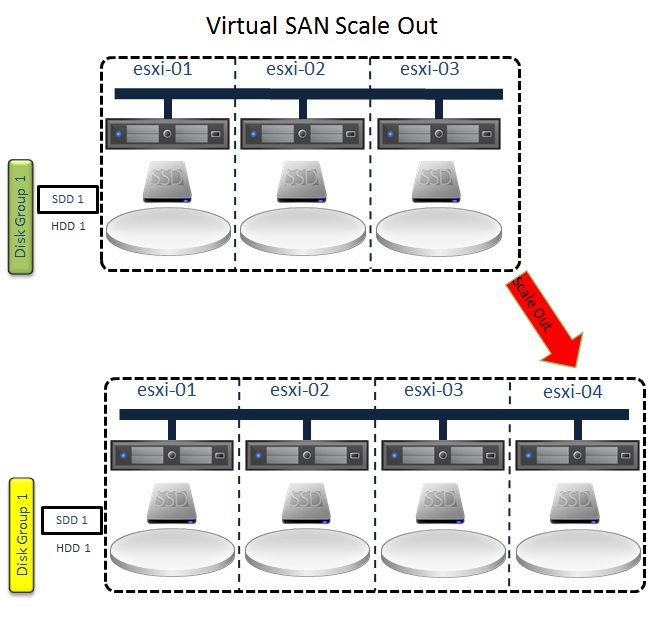
The minimum configuration for a VSAN is 3 hosts (boxes) with 1 SSD and 1 HDD in each.  Lets say you started with that and stored enough data that you need more capacity.  You have the option to add another host (box) with SSD and HDD.  This would be a Scale Out approach to solving the problem.

Virtual SAN Scale Out

But in your analysis you might find that you don’t need the extra host CPU and memory to support more Virtual Machines.  So rather than adding another host, you can simply add more HDDs to the existing VSAN disk groups on the existing hosts for increased capacity and as a side benefit you get increased IOPS performance too.  This would be a Scale Up approach to solving the capacity problem.

Virtual SAN Scale Up - Capacity

Lets say in your VSAN analysis (see here, here, and here for good info on VSAN analysis) you are seeing a lot of read cache misses.  To improve performance caused by this problem you could increase the number of disk stripes for the VMs.  However, this doesn’t necessarily address fixing the problem.  Reducing the number of read cache misses might be better accomplished by adding more SSD caching capacity.  Like the previous example, you have the option to add another host with SSD and HDD.  But if you don’t need the extra host CPU and memory to support more Virtual Machines you can add more SSD to the existing hosts.  For each host in the VSAN enabled cluster you’ll need to create a second disk group, or up to five disk groups, and add at least 1 SSD and 1 HHD to each group.  This will increased IOPS performance (Scale Up for performance) and as a side benefit you get increased capacity.

Virtual SAN Scale Up & Out

A few VMware VSAN Beta Highlights & Best Practices to keep in mind:

  • Min 1 SSD & 1 HDD per host, Max 1 SSD & 7 HDD per disk group, Max 5 disk groups per host
  • Min 3 Hosts, Max 8 Hosts, Max 1 VSAN datastore per cluster (support for more hosts may increase in the future)
  • Max vsanDatastore = (8 hosts * 5 disk groups * 7 disks * size of disks) = 280 * size of disks
  • SSD capacity should be ~10% of your HDD capacity (e.g. 1 GB of SSD to every 10 GB of SAS/SATA).

Virtual SAN Enabled vSphere Cluster Fully Scaled Up and Out 2

VMware Virtual SAN Scales Out as your vSphere cluster Scales Out but don’t forget that you can Scale Up individual hosts as well for both increased capacity and IOPS performance.

Does Virtual SAN (VSAN) Support Blade Servers?… Yes!

Yes, Virtual SAN (VSAN) can be supported on blade servers. VSAN will predominantly be deployed on rack mount servers but I continue to run into customers that are blade shops and they want to take advantage of VSAN.

Option 1

Without going into detail about specific vendors and their hardware options, many blade server vendors support 2 or more SFF SAS/SATA/SSD in their blades.  Make one of those an SSD and the other a SAS/SATA and you are good to go for VSAN.  Put at least 3 blades configured like this or up to 8 (max for VSAN Beta) into a VSAN enabled cluster.

Option 2

Take 3 rack mount servers and install at least 1 SSD and 1 HDD in each or up to 5 SSD and 30 HDDs (max for VSAN Beta).  Put these 3 rack mount servers and up to 5 blade servers (with or without disks) into a VSAN enabled cluster for a total of up to 8 hosts (max for VSAN Beta) into a VSAN enabled cluster.

I have also been asked several times if VSAN will support JBOD that could be connected to blades.  For the Beta, the answer is no but the VSAN Beta program customer feedback is being taken seriously and product roadmaps will be set accordingly.  So the best recommendation is to sign up for the VSAN Beta (http://vsanbeta.com/) if you haven’t already, give VSAN a try, and get active on the VSAN Beta community by doing the following:

  1. Register for a My VMware account here (If you already have one skip to the next step)
  2. Sign the terms of use here (one time only)
  3. Access the VMware Virtual-SAN Beta community website.

Feel free to leave comments about any other interesting ways to deploy VSAN and use cases for it.